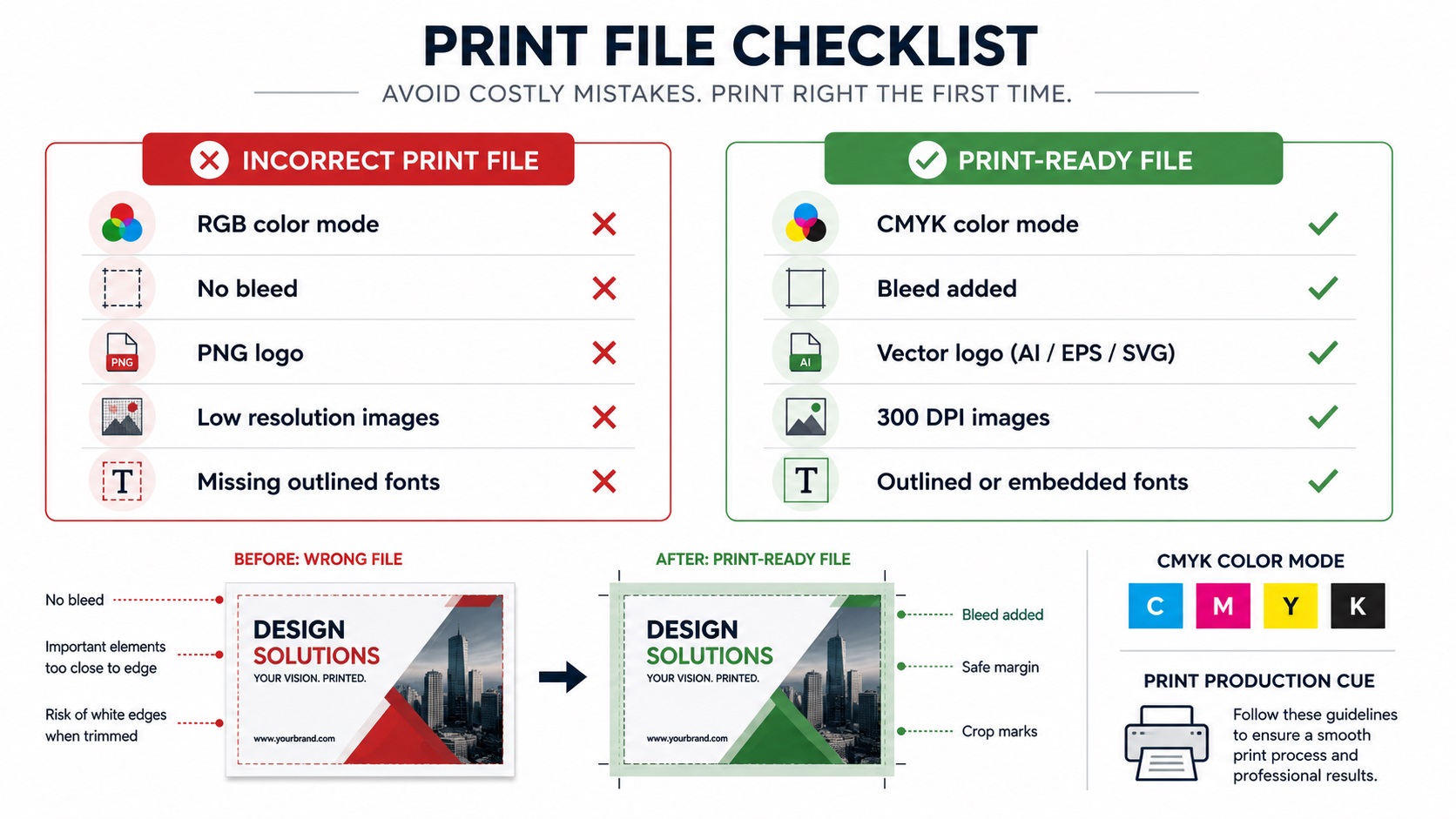
It has happened to almost everyone who has ever ordered print work. You send your files, feel good about it, and then either the printer comes back with questions or the finished product arrives looking nothing like what you expected. Often the culprit is a simple file format problem that could have been caught before anything was submitted.
Here is a straightforward look at what actually happens when the wrong file format goes to a printer, what the most common mistakes are, and how to avoid them.
The Printer Rejects Your File
The best-case scenario when you send the wrong format is that the printer catches it and tells you before production starts. A professional print shop will typically review submitted files before sending them to press. If your file is a PNG when they need an EPS, or a Word document when they need a PDF, they will contact you and ask for the right format.
This causes a delay but no financial loss beyond the time spent. The problem is that not every printer does a thorough pre-press check, and some online print services are set up to accept almost anything and print it as submitted.
The Printer Prints It Anyway and the Result Looks Wrong
When a print service accepts your file without flagging problems, the results can range from slightly off to completely unusable.
A low-resolution PNG logo submitted for a large banner will print blurry. The printer did not create the problem, the file was the problem, and reprinting costs money. Most print shops have policies stating that once a file is approved for print and production begins, reprints due to file quality issues are the customer's responsibility.
A file submitted in RGB instead of CMYK will have its colors converted by the printer's software. The conversion is automatic, not artistic, and some colors shift noticeably in the process. A brand blue that looks vivid on screen might print as a slightly muted, slightly different shade.
A file with live fonts that the printer does not have installed may reflow text or substitute a different typeface entirely. A carefully kerned headline in a custom font can become a default system font in a different weight.
Specific Format Mistakes and What They Cost You
Sending a PNG Instead of a Vector File
For logos and graphics with hard edges, a PNG sent to a professional printer will show soft, slightly blurry edges at print resolution. At small print sizes this might be barely noticeable. At large format sizes it becomes very obvious and looks unprofessional.
For sign shops, embroidery services, screen printers, and vinyl cutters, a PNG is often not workable at all. These vendors need vector paths to do their job. Sending a PNG means either the job gets delayed while you source the right file, or the vendor charges you for a conversion.
Sending an RGB File Instead of CMYK
Color mode mismatches are one of the most common print file problems. They do not always cause visible issues on simple designs, but on brand-specific colors and anything with subtle gradients, the conversion from RGB to CMYK can produce unexpected results.
The fix is to always build print files in CMYK from the start, not to convert at the end. Converting a finished RGB design to CMYK sometimes requires color adjustments that are not always obvious until the file is already in the wrong mode.
Sending a File Without Bleed
A design submitted without bleed will have white edges after trimming if the cut is even slightly off. On a business card or a flyer this can look like a design flaw. On packaging or a large poster it looks careless.
Some printers add bleed themselves and charge for it. Others print as submitted and let the chips fall where they may. Always include bleed to the specification your vendor provides.
Sending a Low-Resolution File
For any raster image element in a print layout, resolution relative to print size matters. A product photo at 72 DPI suitable for a website will print poorly at the same physical size on a high-quality flyer. The image appears soft and details look slightly smeared.
The standard for most print jobs is 300 DPI at the actual print dimensions. For large format printing where viewing distance is greater, 100 to 150 DPI at full print size is typically sufficient.
Sending a File With Live Fonts
Live fonts in a submitted file are a risk. If the printer does not have your font installed, their software substitutes another. The entire typographic design can shift, sometimes subtly and sometimes dramatically.
Converting all text to outlines before submitting removes this risk entirely. The text becomes a vector shape rather than editable type, so it looks exactly the same on any computer and any printer without needing the font installed.
How to Know What Format Your Printer Needs
Every professional printer should be able to provide their file specification requirements. These typically cover:
- Accepted file formats (PDF, AI, EPS, TIFF, etc.)
- Color mode (CMYK, spot colors, RGB for certain digital processes)
- Resolution requirements for raster elements
- Bleed amount
- Whether fonts need to be outlined or embedded
- Any specific export settings for PDF files
If a printer does not provide this information readily, ask for it before building your artwork. Building to their spec from the start is much easier than retrofitting a finished design.
Frequently Asked Questions
If I send the wrong file, will the printer always tell me?
Not always. Professional print shops with a pre-press process will usually flag problems. High-volume online print services sometimes print whatever is submitted. Asking about the review process before ordering is worth doing for important jobs.
Can I fix a wrong color mode after the fact?
You can convert an RGB file to CMYK in Illustrator or Photoshop, but colors may need to be manually adjusted after the conversion to match the original intent. It is better to build in CMYK from the start for print work.
What if I only have a PNG of my logo?
For print jobs that require a vector file, the PNG needs to be converted to a proper vector before submission. A vector tracing service can do this accurately. Once you have the vector file, you will not face this problem again for future print jobs.
Is a PDF always safe to send to a printer?
A PDF is safe when it is a vector-based PDF exported with the correct settings, such as PDF/X-1a, with CMYK colors, embedded or outlined fonts, and bleed included. A PDF that is simply a flattened image of your design is essentially a raster file in a PDF wrapper and has the same limitations.
How do I avoid color shifts when printing?
Build in CMYK, define brand colors with Pantone references for critical colors, request a printed proof before committing to a full run, and check with your printer about their color management process.
Need artwork converted?
VectorFixer can redraw logos, convert PNG files to SVG, and prepare clean production-ready vector files.
Contact Us