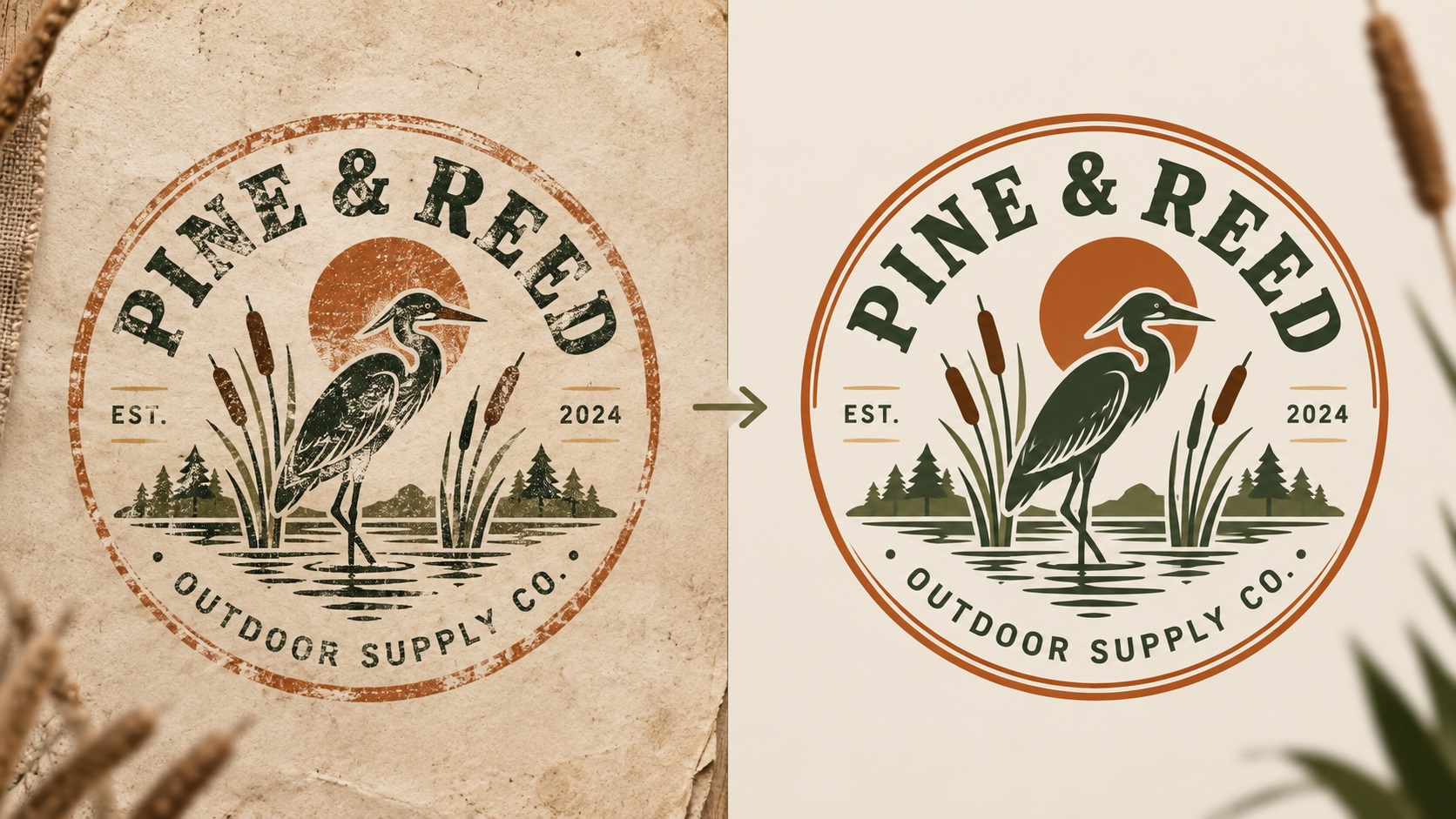
One of the clearest logo design trends in 2026 is a deliberate move away from sterile, perfectly polished minimalism. Brands are embracing textures, grain, intentional imperfection, variable line weights, and hand-crafted aesthetics that signal authenticity and human origin.
VistaPrint, Adobe, Shopify, and most major design trend reports this year all point to the same shift: logos that look like they were made by a person, not generated by an algorithm, are gaining ground. Stamp badges, rough-edged typography, gritty gradients, and hand-lettered marks are everywhere in 2026 branding.
For businesses and designers embracing this direction, there is an important practical consideration that often gets overlooked until a print vendor raises it. Many of the techniques that make these logos look great on screen create real challenges when it comes to producing them physically.
What Makes Textured and Hand-Drawn Logos Different
A traditional clean vector logo uses flat color fills, smooth bezier curves, and precise geometric shapes. Everything is defined, intentional, and easy to reproduce consistently across any production method.
A textured or hand-drawn logo introduces elements that deliberately resist that precision:
Grain and noise: A gritty texture layer applied over the design to give it a worn, printed, or analog feel. On screen it looks like a rich, textured surface. In vector terms it is often a raster image overlay or a complex pattern fill.
Variable line weights: Lines that are not perfectly uniform, with slight thickening and thinning that suggests hand-drawn pressure variation. This can be a genuine vector design choice or it can be a rasterised stroke from a drawing app.
Rough edges and imperfect fills: Edges that are not perfectly clean, fills that have slight texture or irregularity. These look intentional on screen but can create problems in production.
Layered effects: Drop shadows, multiply blends, transparency effects, and gradient maps that build up the distressed or vintage look but exist as non-destructive effects rather than flattened shapes.
The Vectorization Challenge: What Is Real and What Is an Effect
When a business brings a textured or hand-drawn logo for vectorization, the first question is what is meant to be part of the permanent, scalable vector design and what is a screen-based effect that cannot be reproduced in production.
This distinction matters enormously because different production methods handle these elements very differently.
Screen printing cannot reproduce fine grain or texture at typical resolution. A logo that relies on a gritty texture overlay for its character will print as a solid color version of the underlying shapes, which may look quite different from the textured version.
Embroidery works with thread. Thread cannot replicate grain, texture, or fine imperfections. The embroidered version of a textured logo is always a simplified, clean interpretation of the underlying shapes.
Laser engraving burns the material wherever the design is dark. A gritty texture designed to look aged in print will engrave as a complex pattern of tiny marks, which may or may not be the intended effect.
Large-format printing can reproduce texture and grain if the file is prepared at sufficient resolution, but the texture needs to be baked into the raster export at the correct resolution rather than relying on screen-based effects.
What a Good Vectorization of a Textured Logo Produces
For a textured or hand-drawn logo, a professional vectorization typically produces two things:
A clean base vector: All the shapes, letterforms, and structural elements of the logo redrawn as clean vector paths. This is the production-ready version used for embroidery, engraving, vinyl cutting, screen printing, and any single-color or color-limited application. It may look slightly different from the textured original because the texture is absent, but it preserves the character and structure of the design.
A textured version for print and digital: The clean base vector exported with the texture treatment re-applied in a way that is appropriate for large-format printing and digital use. This might be a layered PDF or a high-resolution PNG combining the vector structure with the texture as a raster overlay.
This is different from how a clean geometric logo is vectorized. A two-color geometric logo produces one clean vector that works everywhere. A textured hand-drawn logo benefits from a base version and a textured version, used in different contexts.
Common Sources of Textured Logos in 2026
Many businesses acquire textured logos from specific tools and contexts:
AI logo generators and image generators: Midjourney, DALL-E, and similar tools produce raster images with inherent noise and texture from the generation process itself. These look like textured, hand-made logos but the texture is a byproduct of raster generation, not a deliberate design choice.
Procreate and drawing apps: Designers who create logos in Procreate, Adobe Fresco, or similar apps often incorporate brush textures, grain overlays, and variable-pressure strokes that look great as illustrations but need to be rebuilt as vectors.
Vintage and retro logo templates: Template-based logos with distressed textures are popular for food, craft, and lifestyle brands. These often arrive as raster files or as vectors with complex texture layers.
Stamp and badge logo generators: Online tools that add vintage texture to badge-style logos produce raster images that look like hand-stamped logos but are not structured as production-ready vectors.
How to Approach Vectorizing a Textured Logo
When submitting a textured or hand-drawn logo for vectorization, a few things help the process:
Clarify which applications you need: Tell the service which production methods are in scope. Embroidery and screen printing need a clean base version. Large-format print and packaging can use a textured export.
Share the intent behind the texture: Is the grain or distress an essential brand character that needs to be preserved in all versions, or is it a decorative treatment that can be removed for production use? This changes how the vectorization is approached.
Provide any source files that exist: If the logo was created in Procreate or similar, the layered file may separate the structural elements from the texture. This makes it easier to extract a clean base for vectorization.
Ask for both versions explicitly: Request a clean production-ready version and, if needed, a textured version for print and digital use as separate deliverables.
Frequently Asked Questions
My brand identity is built around the texture. Does vectorization remove that?
Vectorization of the base shapes does not have to remove the textured version. The texture can be preserved for digital and large-format print applications. What changes is that a clean, texture-free version is also produced for applications where texture cannot be reproduced.
Can a textured logo be screen printed?
The underlying shapes can be screen printed cleanly. The texture itself depends on how it is handled. Simple halftone texture effects can be built into a screen printing setup. Complex grain and noise effects usually do not survive the process. The clean base version of the logo is typically what gets screen printed.
My AI-generated logo has that textured handmade look. Can that character be preserved in a vector version?
The structural character of the design can be preserved. The precise texture from the AI generation is harder to preserve in a way that scales to all production methods. A clean manual retrace focuses on capturing the shape and visual character of the design. For large-format and digital use, a textured export can add the analog quality back in a controlled way.
Is a hand-drawn style logo harder to vectorize than a clean geometric logo?
Generally yes, because more interpretation is involved. A clean geometric logo has precise shapes to follow. A hand-drawn logo requires the designer to make judgment calls about which imperfections are intentional brand character and which are incidental artifacts. This takes skill and sometimes requires a conversation to get right.
Need artwork converted?
VectorFixer can redraw logos, convert PNG files to SVG, and prepare clean production-ready vector files.
Contact Us