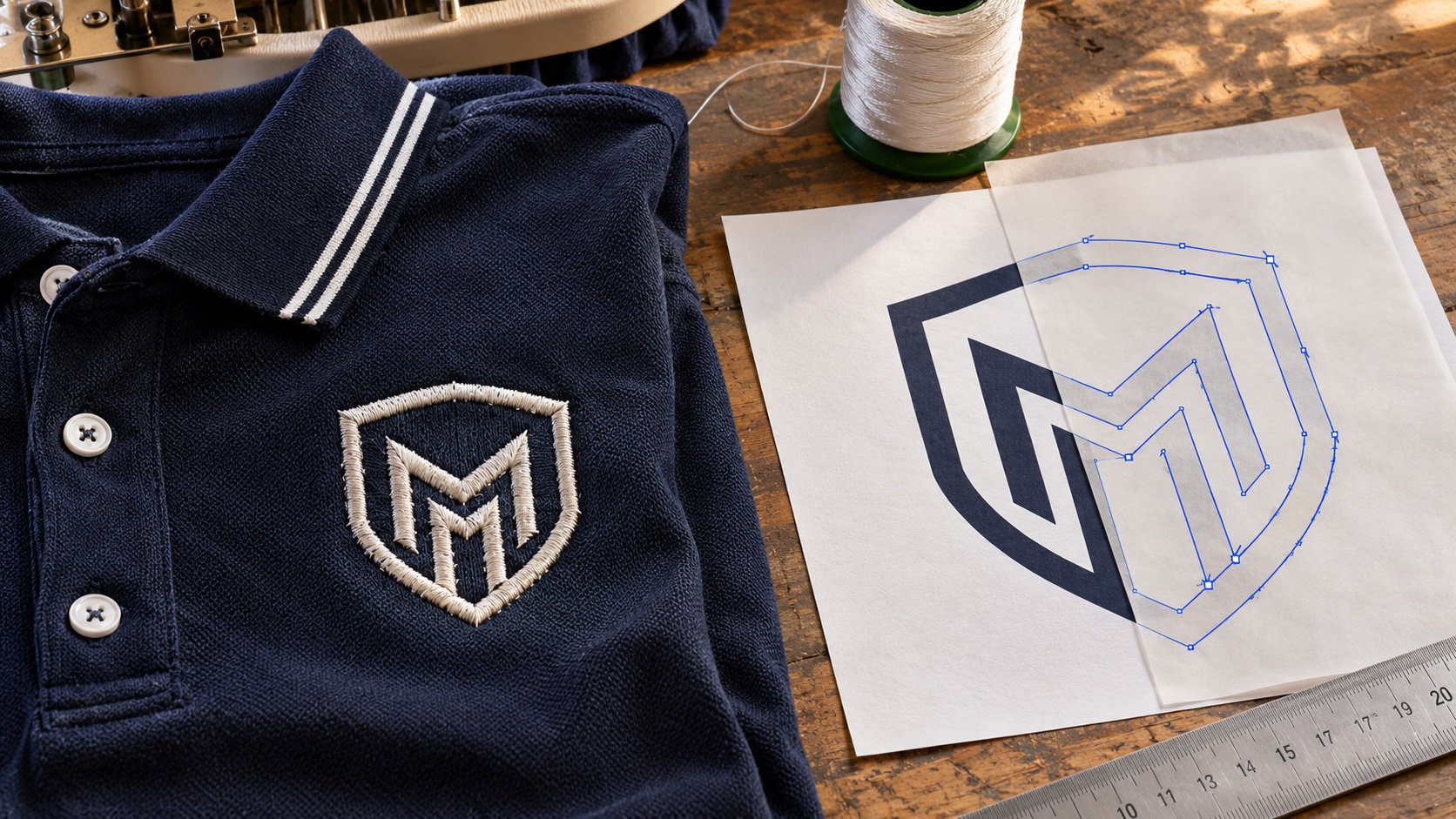
A company embroidered its logo on staff uniforms a few years ago. Now it needs the same logo for a shop sign, packaging, or business cards.
The embroidery supplier finds an old file and emails it across: `company-logo.dst`.
You forward it to a printer, who replies, "We need an AI, EPS, SVG, or vector PDF. This is an embroidery machine file."
That can be confusing. The logo clearly exists inside the DST file, so why can't someone simply convert it into the original vector artwork?
The short answer is that a DST describes machine stitching, not the original design's clean logo outlines. You may be able to recover useful shapes or a visual reference, but a clean brand-ready vector file often needs careful reconstruction.
Here is what to do, what to ask for, and when a manual redraw is worth it.
What is a DST embroidery file?
DST is a widely used embroidery machine file format associated with Tajima-compatible workflows.
It contains the instructions needed to guide stitching, including needle movement and machine control information. The embroidery machine uses the data to reproduce the design in thread.
It is different from a graphic design file.
A vector logo describes intentional paths, letterforms, fills, and shapes. An embroidery machine file describes the stitch result.
That difference becomes important when you need to print the logo on a flat surface, cut it from vinyl, or scale it for a large sign.
Why DST is not the same as SVG, AI, or EPS
Imagine a simple letter O.
In an SVG, the O might be defined using two smooth closed paths: an outside outline and an inside hole.
In embroidery, the same O can be represented by many individual stitches, together with stitch direction, underlay, density, and connecting movements.
Those stitches were chosen to work on fabric. They are not necessarily the same paths that made the original typography.
If you connect every stitch point with a vector line, you do not automatically get the original O. You may simply get thousands of lines crossing the letter.
That is why changing `.dst` to `.svg` in the filename does nothing useful.
It is also why a service offering "DST to SVG" should explain whether it is creating a stitch-path visualization or genuinely rebuilding the logo artwork.
Can a DST file be converted to SVG?
There are two different meanings of "convert," and the distinction matters.
Conversion for display or technical review
Embroidery software may open a DST and produce an on-screen view of the stitches. Some workflows can export a graphic preview or stitch-path representation.
This is useful for seeing the basic design and checking what was sewn.
But a preview image, or an SVG containing the paths of stitches, is not necessarily a clean, editable logo.
Reconstruction into usable vector artwork
Some specialized embroidery software can analyze stitch data and infer approximate object outlines.
Wilcom, for example, documents recognition of stitch types and object boundaries from machine files, while explaining that reconstructed objects do not recover the full information of an original native design.
Even when that recovery works, it may need cleanup and manual correction.
If you need a logo suitable for signs, printing, or design edits, the final test is whether the result has clean, deliberate shapes, not whether the file now ends in SVG.
What information gets lost when a logo is digitized?
When someone turns an original design into embroidery, they choose how to stitch the design.
Those choices are tailored to a garment, thread, machine, and final size.
Depending on the source and machine format, the embroidery file may not retain:
- The original font or editable text.
- Precise graphic curves and intended anchor points.
- The original RGB, CMYK, or brand-color values.
- Original layers and group structure.
- Gradient or shadow effects.
- The complete logo artwork beyond the stitched elements.
- A clean full-size print master.
Some machine formats carry or associate more information than others. Do not assume every DST includes reliable original thread colors or a full graphic color specification.
A DST might also represent a simplified embroidery version of the logo. Its small tagline may have been removed or its lettering thickened to sew well.
Recreating exactly what was stitched could therefore differ from the full brand logo that the business originally used.
First, ask the embroidery supplier for the original artwork
Before paying someone to rebuild the design, contact the embroidery shop or digitizer.
Ask whether it has any of the following:
- The original vector logo, such as AI, EPS, SVG, or vector PDF.
- The original raster artwork used for digitizing, ideally at high resolution.
- An editable embroidery design file, such as a native EMB file where applicable.
- A PDF or image of the original customer-approved logo.
- A high-quality proof showing the exact text and colors.
A real vector source may save considerable work.
A native embroidery design can sometimes help the digitizer recover the shapes more intelligently than a machine-only file. It still may not be a substitute for the original print logo.
If the supplier cannot find anything except DST, the project can continue. Just treat the DST as reference evidence, not as a perfect original design file.
Why the embroidery preview can look different from the actual logo
Embroidery uses physical thread, which changes how curves, outlines, and colors appear.
A thick satin stitch may make a narrow letter look wider. Underlay may affect edges. Stitch angles can create stripes or texture that were never in the source artwork.
A small logo might have simplified fine lines so it could sew reliably.
These are legitimate production changes, not necessarily errors.
When reconstructing the logo, the goal is usually to identify the intended flat shapes beneath those effects.
A designer may use the DST preview, a photograph of the garment, and the correct brand name to work out the original geometry.
But some details will remain uncertain without another reference.
What if you only have an embroidered polo or cap?
Sometimes the file is gone entirely, and the only surviving version of the logo is sewn onto clothing.
You can still create useful reference material.
Photograph the logo:
- In even natural light rather than harsh flash.
- Straight on, with the garment as flat as possible.
- Close enough to show the letters but without blurring.
- With a second photo showing the entire garment for context.
- Next to a ruler when size is helpful.
Check the spelling and color names separately. Threads may have faded, and photographs are not reliable sources for exact brand color values.
An embroidery photograph is a visual reference. It should not be confused with an original editable logo.
For a straightforward wordmark or icon, a manual vector redraw may still produce a clean master.
The practical workflow for rebuilding a logo from DST
A careful process looks like this.
1. Open the DST in appropriate embroidery software
Use a compatible embroidery viewer or ask the embroidery shop to provide a clear preview.
Check the orientation and dimensions. Some viewers may show generic thread colors when actual colors are not available.
2. Confirm what the logo is supposed to say
Write out the exact business name, tagline, punctuation, and capitalization.
Do not guess missing text from stitches.
3. Compare other references
Look for an old website header, branded invoice, business card, vehicle decal, or archived image that shows the logo before digitizing.
Even a modest-quality original graphic can clarify details hidden by thread.
4. Rebuild intentional shapes
A vector artist reconstructs the icon and lettering using smooth curves, clean corners, and correct proportions.
The goal is not to trace every individual stitch.
5. Correct typography and spacing
Confirm that repeated letters match where intended, openings in letters are clean, and the wording is optically balanced.
6. Recreate the right color versions
Use approved brand colors if available. If not, mark color choices for customer approval rather than claiming they were recovered from the DST.
7. Test the actual vector output
Open the finished AI, SVG, EPS, or vector PDF. Check that it contains real scalable shapes, not an embedded screenshot.
8. Export files for the intended vendor
A printer, sign shop, or laser cutter may have different requirements. Prepare the exports to suit the actual order.
This process can produce something much more useful than a quick file-extension conversion.
Why automatic tracing may make the file messy
You might export a PNG preview from the DST and pass it through an image tracing tool.
For simple, bold artwork, that can produce a rough starting point.
But the preview contains stitch texture, uneven edges, and shadows.
The tracer may interpret each thread detail as a separate shape. The result could contain thousands of anchor points, tiny islands, and wavy contours.
A file like that might technically be vector, but it can be difficult to edit or unsuitable for vinyl cutting and signage.
Before accepting the output, look at its outline or wireframe view.
A clean logo should have intentional paths that follow the intended design rather than individual stitches.
How much can you resize a DST file?
This is a separate issue from recovering a vector logo.
Embroidery machine files are designed for stitch production at specific sizes. Enlarging them without regenerating stitches can change stitch spacing and density.
Wilcom's guidance notes that stitch-only designs without object recognition are generally best kept close to their original size, recommending approximately plus or minus 10% rather than large changes.
That is embroidery software guidance, not a general vector-art scaling rule.
A reconstructed clean vector logo, by contrast, can be enlarged for print without the same pixelation or stitch-density problem.
However, the vector logo must still be newly digitized or adapted for any future embroidery production.
Is a PNG preview better than the DST for vector redraw?
The DST can preserve useful information about the stitched shapes, while a high-quality preview helps the artist see them.
For most logo redraw work, having both can be helpful.
The preview alone may contain textured or simulated lighting effects that make boundaries ambiguous.
The DST file alone may require specialized software to inspect.
If available, add a photo of the real garment and any older brand artwork. Multiple references reduce guessing.
What if the logo contains a small slogan?
The embroidery version may omit tiny wording that was present in the original logo.
For a business moving into storefront signage or printed packaging, you should not assume the missing words never existed.
Ask the owner for the correct wording.
You can create a full brand logo for general use and a smaller simplified version for embroidery, patches, or other narrow spaces.
This keeps the identity consistent without forcing every detail into every production method.
What should you receive from a redraw service?
Ask for usable deliverables, not just one attractive preview.
A practical package may include:
- An editable or production-friendly vector master.
- SVG or EPS when needed by suppliers.
- A true vector PDF.
- Transparent PNG exports for everyday use.
- A full-color version.
- One-color dark and light variants where appropriate.
- A clear note about any reconstructed or uncertain details.
The exact formats depend on the project and the service agreement.
Ask to review a proof before approval, especially when the only reference was an embroidered item.
When does a manual redraw make sense?
Manual recreation is particularly useful when:
- You only have a DST and need a business logo for print.
- A printer rejects the embroidery file.
- The logo has recognizable lettering but no editable source.
- Automatic vector conversion produces tangled paths.
- You need a larger sign or clean vinyl-cut geometry.
- The embroidery version differs from the brand's full artwork.
- Your team needs a reusable logo asset for multiple suppliers.
A clean original vector file is always preferable when available. But losing that source does not mean you have to replace the brand.
Frequently asked questions
Can I open a DST file in Adobe Illustrator?
Illustrator does not ordinarily treat DST machine data as a native logo design. You may be able to import an intermediate preview or reconstructed geometry, but the result still needs inspection and may require redraw.
Is DST a vector file?
It contains coordinate-based stitch instructions, but it is not the same kind of editable vector artwork as an AI, EPS, or SVG logo.
Can I just rename DST to SVG?
No. Changing a filename extension does not convert the underlying data or recreate the original artwork.
Is an EMB file better than DST?
For editing embroidery designs in compatible Wilcom workflows, native EMB generally preserves more design information. That does not guarantee it contains the original print-ready logo.
Will converting DST to SVG recover the original font?
Not reliably. A designer may need to identify a similar licensed font or reconstruct custom letter shapes using other brand references.
Can a logo rebuilt from DST be used for embroidery again?
Yes, as source artwork for a new digitizing job. The new stitch file still needs to be prepared for the intended fabric, size, and machine.
Don't let an embroidery file be your only brand asset
If you have a DST, you have evidence of how the logo was stitched. You do not necessarily have the original clean logo artwork.
Ask for the true source first. When it is unavailable, use the embroidery design and other brand references to rebuild accurate vector paths.
If you need to recover a business logo from an old DST, an embroidered garment, or a stitch preview, contact VectorFixer and include everything you still have. A careful redraw can produce a reusable graphic master for your next printer, sign shop, or designer.
Further reading
- Wilcom: Understanding embroidery files
- Wilcom: Embroidery files and object recovery
Need artwork converted?
VectorFixer can redraw logos, convert PNG files to SVG, and prepare clean production-ready vector files.
Contact Us