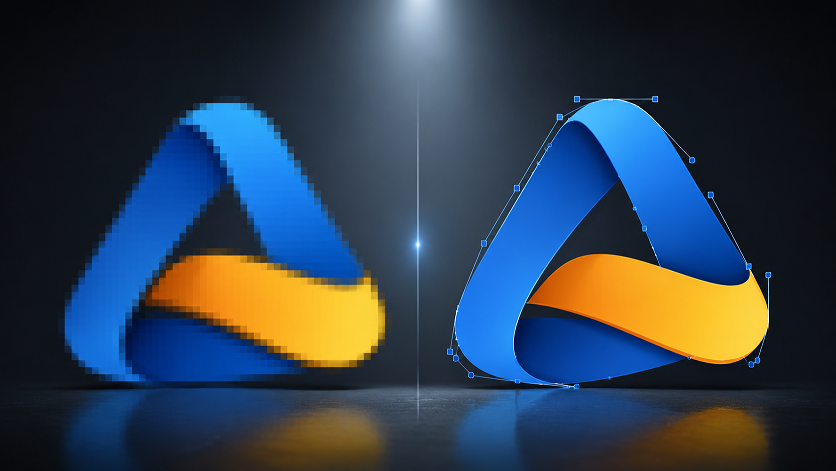
When someone asks for your logo file, and all you can find is a small JPG buried in an old email, you already know what happens next. It prints blurry. The edges look jagged. The sign maker comes back asking for something else.
This is one of the most common problems small businesses run into, and it has a straightforward fix: converting your raster logo into a proper vector file.
Here is what that process actually involves.
Why Raster Logos Break at Large Sizes
Raster images are grids of pixels. Each pixel is a fixed coloured square, and the total number of pixels determines the image resolution. That resolution is locked in at the time the file is created.
When you scale a raster image beyond its native size, the software has to interpolate basically what the extra pixels should look like. The result is the blur and blockiness you see when a small logo gets stretched onto a banner or vehicle wrap.
A 200x200 pixel JPG contains 40,000 pixels. A 3-metre banner at 300 DPI needs over 14 million. There is no way to recover information that was never there.
Why editing the file does not help
Boosting the resolution in Photoshop or resizing in another editor does not add real detail. It just upscales the existing pixels. The file gets larger; the quality stays the same. Print shops see this constantly, and they will still reject the file.
What a Vector File Does Differently
Vector files store mathematical descriptions of shapes rather than grids of pixels. A circle in a vector file is not a ring of coloured squares; it is an instruction: draw a circle of this radius, at this position, with this fill colour.
When you scale that circle, the software recalculates the instruction at the new size. The output is always sharp. A vector logo looks identical on a business card and on the side of a truck.
SVG, EPS, PDF, and AI are all vector formats. They are what print shops, embroidery studios, sign makers, and vehicle wrap companies ask for, because they work at any size without any quality loss.
What Vector Conversion Actually Involves
Converting a raster logo to vector is called vectorisation or vector tracing. The original raster file is used as a reference, and the logo is rebuilt from scratch as vector paths.
Automated tracing
Adobe Illustrator's Image Trace tool can analyse pixel data and generate vector paths automatically. For very simple logos with clean edges and solid flat colours, this can produce a usable result.
For anything more complex, fine details, subtle curves, drop shadows, overlapping elements, automated tracing generates messy path data. Too many nodes, imprecise curves, broken colour areas. The file is technically a vector, but it behaves badly in production.
Manual vector redraw
Professional vector services rebuild the logo by hand. A designer uses the raster file as a reference and redraws each element using vector drawing tools. The resulting paths are clean, the curves are accurate, and the colour areas are properly separated.
This is what production environments actually need. A manually redrawn vector file behaves exactly as expected in Illustrator, InDesign, embroidery software, or any other tool downstream.
When You Need Vector Conversion
The situations that send clients to a vector conversion service most often:
- Large-format printing — banners, posters, exhibition stands, and hoardings all require vector artwork for logos and graphics
- Embroidery — clean edges and separated colour areas are essential for the digitising process that drives embroidery machines
- Vehicle wraps — logos need to be sized and positioned across large curved surfaces; only a vector file gives wrap designers that flexibility
- Screen printing — spot-colour printing requires clearly defined, separated colour regions
- Branded merchandise — engraving, embossing, and most merchandise production processes require a vector source file
- Cricut and vinyl cutting — cutting machines follow vector paths; a raster image cannot be used directly
If any of these apply to your logo, you need a vector file.
What a Good Vector Conversion Delivers
Not every vector conversion is the same. An automated trace saved as EPS is technically a vector file, but it may have thousands of unnecessary anchor points, rough curves, and colour issues that cause problems further down the line.
A quality manual redraw gives you:
- Clean path data with smooth, accurate curves
- Properly separated colour layers
- Fonts either embedded or converted to outlines
- Files in the formats you actually need: SVG, EPS, PDF, AI
- A result that matches your original logo as closely as possible
At VectorFix, every job is done manually. We do not run your file through an automated tool and send back the output. We redraw it.
Frequently Asked Questions
Can any logo be vectorised? Almost always, yes. Even heavily degraded or very small logos can usually be redrawn from the visible shapes. The worse the source file, the more interpretive the work, but a professional redraw can recover a usable result in most cases.
Will it look exactly like my original? For logos with solid colours and clean shapes, the vector version will be visually identical. Logos with photographic elements, complex gradients, or textures may need some stylistic interpretation, since those effects work differently in vector format.
What formats will I get? At VectorFix, standard delivery includes SVG, EPS, PDF, and AI. If you need a specific format for a particular production process, just let us know when you order.
How fast is the turnaround? Most logos, simple to moderately complex, are completed within 24 hours. More involved multi-element designs may take a little longer. We will let you know upfront.
Ready to Fix Your Logo?
A low-resolution logo limits where your brand can appear. One proper vector file fixes that permanently, usable at any size, for any purpose, with any printer or production service.
If your logo only exists as a JPG, PNG, or other raster file, upload it to VectorFix, and we will rebuild it as a clean, production-ready vector.
Only have a small or damaged logo?
Send the clearest reference you can find. With the logo redraw service, I rebuild readable shapes and lettering rather than simply enlarging the pixels. If the artwork is intact and you need a reusable set of scalable files, see logo vectorization. Include the size and use your printer has in mind.
Need artwork converted?
VectorFixer can redraw logos, convert PNG files to SVG, and prepare clean production-ready vector files.
Contact Us