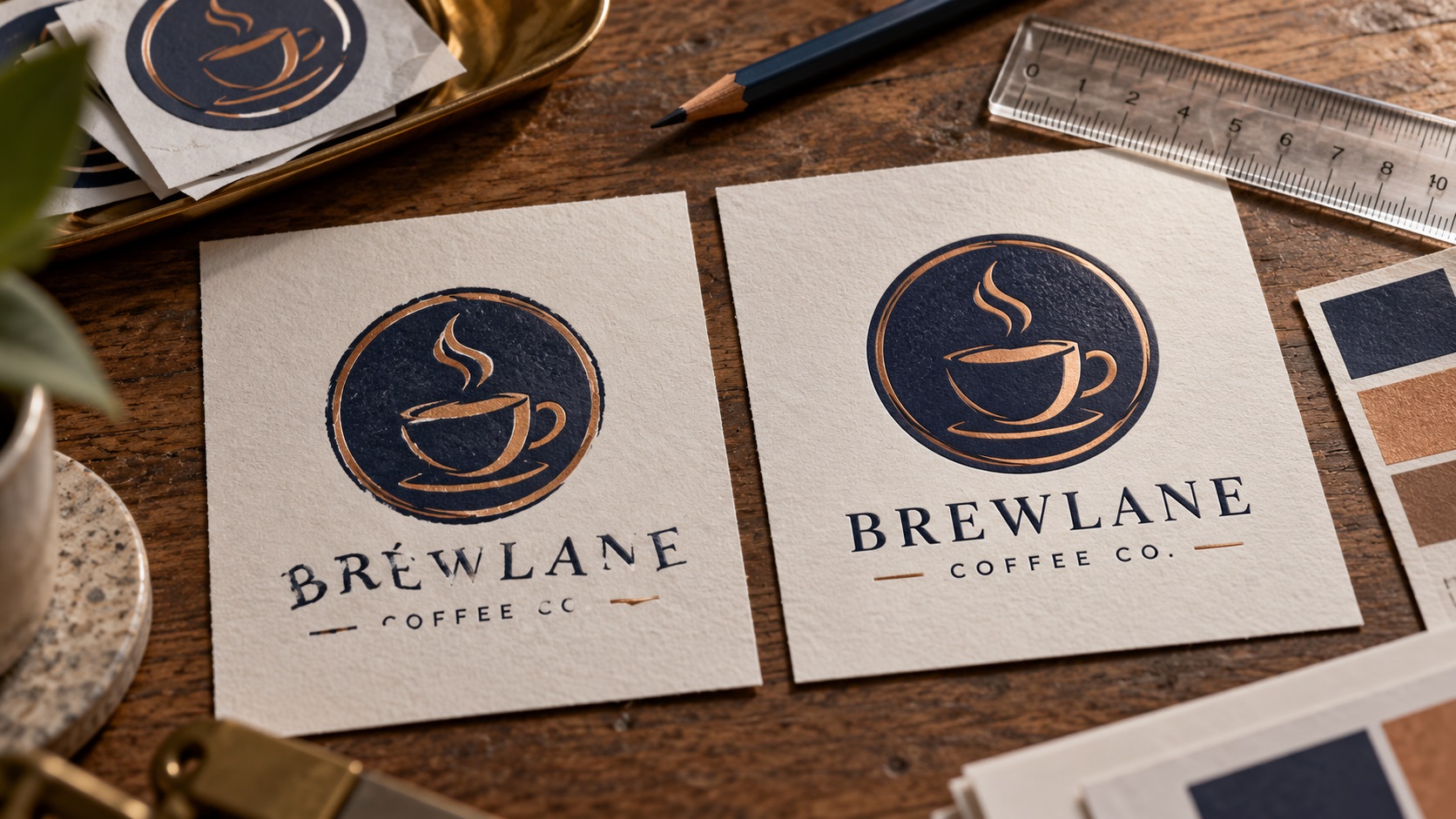
An AI image generator gives you a logo concept you love. The symbol looks good, the colors fit your brand, and the layout feels right. But when you zoom in, the business name contains a strange letter. Your tagline has a word that is almost spelled correctly. The curves of two identical letters do not even match.
You could keep asking the image generator to try again. Yet every new image may change the icon, proportions, or styling you wanted to keep.
For a logo that will appear on signs, clothing, packaging, or business cards, the more reliable approach is often to rebuild the lettering deliberately and keep the useful parts of the concept.
Here is what can go wrong with AI-generated logo text, how to assess it, and what to request when the artwork needs to become a real brand asset.
Why AI-generated logo lettering can look almost right
An image-generation model can produce pixels that resemble a word without delivering a separate editable text object.
That distinction matters. In a normal logo file, the words might be live type or carefully drawn letter shapes. Each character has a defined outline and intentional spacing.
In a generated raster image, the letter shapes are part of the picture. An unusual curve could be an intentional style choice, a mistaken letter, or simply an artifact.
Common problems include:
- An extra stroke that makes an E resemble a B.
- Two letters merged into one shape.
- A lowercase letter that resembles a different character.
- Uneven spacing between repeated letters.
- A slogan with invented or missing words.
- A character that changes style halfway through the name.
- Decorative flourishes crossing into the actual lettering.
The image might look convincing at phone size but fail immediately when a customer reads it on a storefront.
Start by checking the exact wording
Before anyone traces or cleans the file, write down the precise text that belongs in the logo.
Confirm the company name, punctuation, capitalization, spacing, slogan, and any date or location in the design.
For example, a brand named "Northline Studio" should not become "Northlne Studia" simply because the generated image looks attractive.
Check the spelling against a trusted business record or the wording you approved. Do not rely on what a design tool guesses the image says.
For stylized letterforms, ask the owner which unusual shapes are deliberate. A decorative character can sometimes be part of the identity, but an incorrect business name should not silently become the final logo.
Why image tracing does not automatically fix the text
Image tracing converts visible image edges into vector paths. Illustrator, Inkscape, and other tools can use tracing to create a starting set of shapes.
But tracing follows what is in the image.
If the original letter is misshapen, the trace can produce a scalable misshapen letter. If the tagline contains invented characters, the trace faithfully captures the invented characters.
The result may have hundreds of anchor points around letters that should have smooth, simple curves.
This is why "I converted it to SVG" is not the same as "I corrected the logo."
The best workflow depends on whether the lettering can be identified and rebuilt reliably.
Decide whether to match a font or redraw custom letters
There are two main routes for rebuilding the text.
Option 1: Recreate the wording with a suitable typeface
If the logo uses fairly ordinary lettering, a designer can identify a close font, type the correct words, and adjust weight, width, spacing, and character details.
This is often the most efficient approach when the original lettering does not appear to be highly customized.
A close match may not be an exact match. The business owner should review the replacement before approving it.
Also check that the selected font is properly licensed for the intended commercial and logo use.
Option 2: Redraw the lettering as custom vector shapes
If the concept has unique letterforms, a designer may need to reconstruct those characters manually.
The process involves drawing smooth curves, keeping consistent stroke weights, correcting letter spacing, and repeating details intentionally.
Custom redraw work can preserve more of the concept's visual personality than substituting a generic font.
However, it requires judgment. A generated picture does not necessarily contain a recoverable original font or an exact intended construction.
That is why a customer should provide the correct wording and approve the rebuilt version instead of expecting a designer to discover a hidden font that may never have existed.
What should happen to the symbol while the text is repaired?
You may love the icon and want it left alone.
That is a reasonable instruction, but it helps to separate two questions:
- Does the symbol itself need clean vector geometry?
- Does the symbol need to change visually?
The symbol can be redrawn into clean paths while retaining the same approved shape. That is a technical reconstruction rather than a new concept.
For some generated images, the icon also has uneven symmetry, broken linework, or unclear negative space. These may need deliberate correction.
Tell the designer which characteristics must stay recognizable and which artifacts may be cleaned.
If you want only the business name fixed, say that clearly. Do not let a lettering cleanup turn into an unnecessary logo redesign.
Why the letters may look worse on a large sign
A tiny image hides problems. A large sign exposes them.
Imagine printing a logo from a 1024-pixel-wide JPG on a storefront panel several feet across. The image can become soft, especially around thin strokes and small text.
Enlarging or upscaling may help with some image tasks, but it does not reliably restore the correct shape of every letter.
For a simple business wordmark, genuine vector letterforms are much more useful because the curves can scale without depending on the original image's pixel grid.
A clean source file can also be adapted for vinyl lettering, print, embroidery preparation, and online use.
Check spacing, not just spelling
A logo can have every letter spelled correctly and still look wrong.
This often happens when individual letters are rebuilt without looking at how the word reads as a whole.
Important details include:
- The distance between each pair of letters.
- The width and visual weight of characters.
- The alignment of letters along a baseline.
- The height of capitals and lowercase letters.
- The shape of counters, which are the openings in letters such as O, P, and B.
- Whether repeated letters actually match.
- Whether the tagline is centered beneath the correct part of the wordmark.
Good logo typography relies on optical balance, not just equal numerical spacing.
For example, the gap between A and V may need a different adjustment from the gap between H and H because their visible shapes are different.
Do you need a completely new logo design?
Not always.
There are three distinct situations worth separating.
Lettering correction: The approved concept is sound, but the words are incorrect or distorted. Rebuild the words.
Vector cleanup or redraw: The layout and wording are acceptable, but the image is blurry, jagged, flattened, or full of irregular paths. Reconstruct the artwork.
New logo design: The concept is confusing, lacks a usable visual identity, or needs major changes to its symbol, layout, or meaning. That is a broader design project.
A customer who likes the overall logo may only need the first two.
VectorFixer's AI image-to-vector service specifically covers rebuilding generated artwork, including lettering reconstruction where practical when the correct wording is supplied.
How to prepare the repaired text for printing
Once the spelling and shapes are approved, the production file should be checked for the intended use.
For ordinary print vendors, a clean vector format such as AI, EPS, or vector PDF can preserve sharp logo paths. SVG is also useful in many workflows.
For cut vinyl, the supplier may need suitable closed paths and simplified geometry.
For embroidery, the logo remains source artwork and still requires digitizing into stitches. Tiny slogans may need an approved simplified version.
For a website, SVG or a correctly exported PNG may be suitable depending on how the site is built.
There is no single file that guarantees perfect production in every medium. The best deliverable package includes a clean master and appropriate exports.
What about the tagline below the business name?
AI-generated taglines can be especially difficult because the text is smaller than the main wordmark.
If the letters are too unclear to read, do not ask the repair service to guess what they were supposed to say.
Provide the exact tagline.
Then decide whether it should remain part of the small logo variant. A long slogan that reads well on a poster may become illegible when embroidered on a polo or printed on a pen.
You can maintain a full version and a compact version without losing your core brand identity.
Why converting fonts to outlines matters
If the corrected text is rebuilt with a licensed font, the final print copy may still use editable type.
Some vendors ask for the text to be converted to outlines so the lettering does not change when the file opens on another computer.
Outlining converts the displayed letters into vector shapes.
Keep an editable master as well. After outlining, ordinary spelling corrections become less convenient.
The print copy and editable source can coexist.
Check color and background after repairing the text
Generated logos sometimes include shadows, gradients, fabric textures, or a pale halo around the letters.
Decide whether those effects are actually part of your desired brand identity.
A clean flat-color version is often helpful for production jobs such as embroidery, single-color decals, and stamps.
If the image was generated with a white background, simply saving it as a PNG will not make that background transparent.
A proper transparent export should contain only the intended visible elements, with clean edges.
For a general logo master, consider keeping full-color, one-color dark, one-color light, and transparent-background versions.
A practical example: a generated café logo
Suppose the AI concept contains a coffee-cup symbol and the business name "Morning Ember."
The icon looks good, but one E is malformed and the tagline is partly unreadable.
A focused repair project might look like this:
- Confirm the correct name and tagline with the owner.
- Save the original image as a visual reference.
- Reconstruct the cup icon with clean vector paths.
- Select a close licensed typeface or redraw custom letters.
- Correct the two E shapes and adjust spacing.
- Produce a full logo and a simpler no-tagline version.
- Export vector and transparent PNG files.
- Compare the final version against the approved concept.
The finished logo is not a new AI image. It is a reconstructed artwork file with intentional spelling and geometry.
What to send when requesting a repair quote
The clearest brief includes:
- The original generated image at the highest available quality.
- Exact business name and tagline.
- Any letters you know are wrong.
- A note stating whether the symbol must stay visually the same.
- The preferred colors.
- Intended uses such as signage, shirts, packaging, or web.
- A reference showing the style you want preserved.
- Any printer or sign shop file requirements.
- The deadline for the finished files.
If there is an unusual symbol or stylized letter you deliberately like, point it out so it is not accidentally "corrected" away.
Common mistakes when fixing AI logo lettering
Regenerating the whole image for a one-letter change
You may fix the spelling but lose the icon or layout you liked. Rebuilding the type separately can be more controllable.
Auto-tracing distorted letters without reviewing them
The traced result becomes scalable but remains incorrect.
Guessing an unreadable tagline
Invented wording creates a brand and approval problem. Confirm exact text with the owner.
Ignoring font licensing
A close match should be suitable for the intended commercial use.
Exporting only a flattened PNG
That may be enough for some uses but leaves you dependent on the same raster dimensions later.
Assuming a vector file proves a logo is legally unique
File quality does not establish ownership, originality, or trademark clearance. Review those questions separately when they matter to your business.
Frequently asked questions
Can you fix misspelled text in an AI-generated logo without changing the image?
Often, yes. The wording can be reconstructed while the approved symbol and layout are retained. How closely it matches depends on the original design and clarity of the reference.
Can an AI-generated logo be converted to SVG?
Yes, many logo-style images can be recreated as vector shapes. A meaningful conversion requires inspecting the geometry and correcting visible problems rather than merely changing the file extension.
Will image tracing correct an AI spelling mistake?
No. Tracing follows the visible pixels. You need to replace or redraw the incorrect letters.
What if I do not know the font used?
The source image may not contain a genuine named font. A designer can search for a suitable match or reconstruct custom lettering and ask you to approve it.
Do I need AI and EPS files for printing?
Some print and sign vendors prefer AI, EPS, or vector PDF. Check the receiving vendor's file requirements and keep a reusable vector master.
Turn the concept you like into lettering you can trust
You do not necessarily need to discard an AI-generated logo because one word looks strange. What you need is a careful reconstruction of the approved design, with correct text and consistent vector geometry.
If your image contains garbled lettering, misspelled text, or blurry wordmarks, send the file to VectorFix with the correct wording and what you want preserved. The goal is a logo you can read, edit, resize, and share with production vendors.
Need artwork converted?
VectorFixer can redraw logos, convert PNG files to SVG, and prepare clean production-ready vector files.
Contact Us