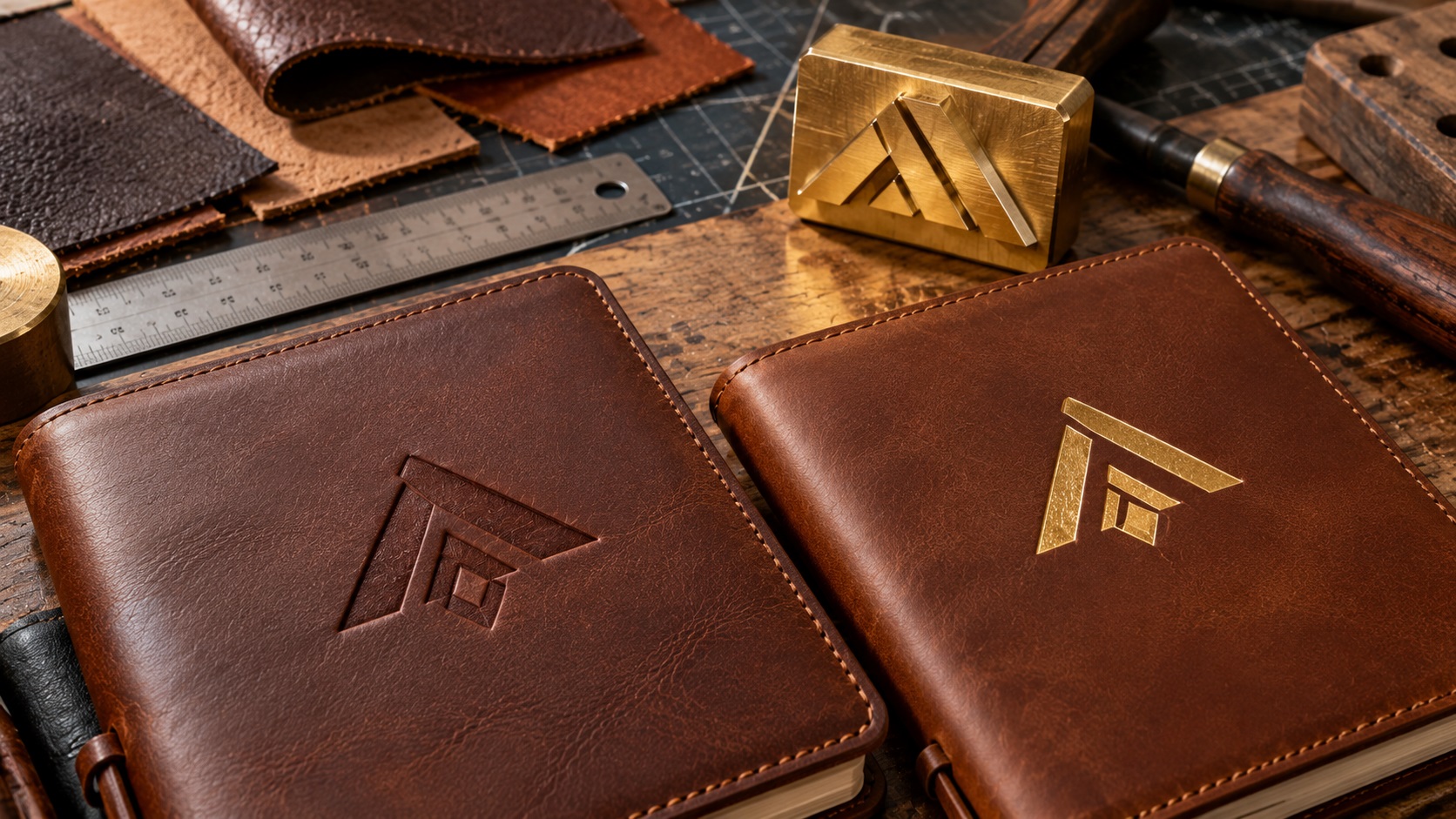
A business orders leather notebooks with its logo pressed into the cover. The mockup looks elegant, but the supplier replies that the fine lines are too thin and the small slogan may not show.
The business already has a PNG and a PDF. Why does the supplier still need different artwork?
Because leather debossing is not ordinary printing. The logo is transferred through a physical impression, often made using a custom metal die. Tiny details that work on a website can disappear when pressure is applied to a textured material.
If you want to put a logo on a leather journal, wallet, key fob, bag, desk mat, or other branded gift, the right file preparation makes a big difference.
What is leather debossing?
Debossing creates a recessed impression in the leather or similar surface.
A tool or die is pressed into the material, often using controlled heat and pressure, to create the negative shape of the artwork.
For example, a bold company name can become a subtle indented wordmark on a brown leather notebook cover.
The finished mark is often tone-on-tone. It is visible through the change in surface depth, light, and shadow rather than through printed ink.
That physical process explains why the original artwork needs to be clean, simple, and carefully sized.
Debossing versus embossing versus foil stamping
These terms are easy to confuse.
Blind debossing
The logo is pressed into the surface without colored foil or ink. The result is a subtle recessed impression.
Embossing
The logo is raised above the surrounding surface. The tooling and material setup differ, and not every leather-product vendor offers the method.
Foil stamping or foil debossing
A metallic or colored foil is transferred using a stamping process. Depending on the specific technique, the impression may also be recessed.
Gold and silver are popular choices, but available foil colors depend on the supplier.
For a customer, these are different finishes with different artwork and tooling considerations. Decide which one you are ordering before anyone prepares the production file.
Why your regular logo file may not be suitable
A logo used on a business card might contain:
- Very thin decorative lines.
- A small slogan.
- A multicolor gradient.
- Soft shadows.
- Intricate overlapping shapes.
- Small symbols with narrow openings.
All of these can look attractive in a digital layout.
A leather stamping die is not reproducing screen colors, opacity, or soft pixels. Its main job is to create deliberate physical shapes in the material.
Some detail may need to be simplified, enlarged, or removed before a reliable die can be made.
That does not mean the business needs a new identity. It may only need a leather-specific variation of its existing logo.
What logo file does a leather debossing supplier need?
Many manufacturers prefer true vector artwork in a supported format such as:
- AI (Adobe Illustrator)
- EPS
- SVG
- Vector PDF
Vector artwork defines shapes as curves and paths instead of a fixed grid of pixels.
That makes it easier for the supplier to resize the logo, inspect letter contours, prepare a stamping die, and adjust individual shapes.
However, a filename alone does not prove that the file is actually vector.
A PDF can contain nothing more than a flattened image. An SVG can contain an embedded raster picture or rough automatic tracing.
The useful question is not “Do you have a PDF?” but “Does the file contain clean, editable vector shapes suitable for this supplier's tooling?”
If only a JPG or PNG is available, VectorFixer's logo vectorization service can rebuild recognizable shapes and lettering into a cleaner reusable master.
Why most debossed logos need a one-color version
Blind debossing creates depth, not a full-color print.
A red wordmark and a blue icon cannot become red and blue through blind debossing alone. They become impressions in the material.
The most useful production file is typically a solid, one-color representation of the exact shapes the die should stamp.
In a simplified source preview, black might represent the areas being pressed and white might represent open areas.
Ask the manufacturer which color convention its artwork template uses before assuming that black always means a recessed feature.
A logo with gradients or shadows should be translated into intentional solid shapes rather than left as a soft effect that the die cannot reproduce.
Can you keep small text and fine lines?
Sometimes, but it depends on the product and process.
Manufacturers set different minimum sizes based on their tooling, leather type, and stamping method.
For example, some leather debossing vendors recommend avoiding line weights under about 1 point at final size. Others publish requirements in millimeters for minimum text height, line thickness, and spacing.
Those figures are vendor-specific. They should not be treated as a universal manufacturing standard.
A good way to work is to confirm:
- The final physical logo width and height.
- The minimum acceptable stroke width.
- The smallest permitted letter height.
- The minimum gap between separate shapes.
- The leather or synthetic material being used.
Once those values are known, you can evaluate the actual logo.
If a letter cannot hold its shape at the requested size, a slightly bolder approved version may be more reliable than simply sending the same thin design in another format.
Why gaps are just as important as stroke thickness
Imagine a logo with the business name inside a circle.
The letter strokes might be thick enough, but the spaces inside letters such as A, B, O, and P could be extremely narrow.
When those shapes are impressed into leather, small openings can lose clarity.
The gaps between neighboring letters can also become crowded.
An effective production redraw may open those spaces slightly while maintaining the recognizable shape of the lettering.
This type of adjustment should be made at the final imprint dimensions, not by eyeballing a highly enlarged image on a monitor.
Leather texture changes the result
A logo does not deboss identically on every leather product.
Smooth, firm leather may show an impression differently from a soft, heavily textured or pebbled surface.
Thickness, finish, surface grain, backing, temperature, and pressure can affect how well the mark appears.
Synthetic leather and other imitation-leather materials can behave differently again.
A file that works nicely on a smooth journal cover may not produce the same definition on a small, textured key ring.
That is why the best proof is often a physical sample on the actual material, not only a digital rendering.
Ask whether your selected product has been tested for the proposed logo size and level of detail.
How to prepare text for a debossing die
If the logo contains a business name, first confirm the spelling and approved font styling.
Then inspect the text at the planned finished size.
For many vendors, converting the text to vector outlines is helpful because it preserves the letter shapes without requiring the supplier to install the font.
That does not automatically make the wording deboss-ready.
Text might still be too small, too thin, or too tightly spaced.
You may need to adjust the outlines and letter spacing, subject to brand approval.
Keep an editable master before outlining the text. It makes future corrections easier.
What if your logo has a tagline?
A tiny tagline under a bold wordmark can be the first part that becomes unreadable in leather.
For example, a full logo may say “Pine & Harbor” with “Crafted for Everyday Living” underneath.
On a large leather folio, that entire layout might fit. On a 25 mm-wide luggage tag, the tagline may be impractical.
You could:
- Remove the tagline from the debossing version.
- Increase the overall imprint size if the product allows.
- Use a separate simple monogram on smaller goods.
- Place the tagline on packaging or a printed insert.
- Move secondary text to a different, larger product area.
This is a normal use-case variation, not necessarily a rebrand.
Does a gold foil logo need different artwork?
It may.
For hot-foil decoration, the logo typically becomes one solid foil color per stamping operation. The exact colors and combinations depend on the vendor's equipment.
Complex multicolor artwork does not become a full photographic image through a single foil stamp.
Fine lines, tiny gaps, and intricate texture can still cause problems because the artwork is transferred using a physical tool.
Request the foil manufacturer's artwork specification rather than assuming a graphic prepared for ordinary offset printing can be used unchanged.
Also confirm whether the desired foil works with the specific leather finish. Some products and surfaces take foil more reliably than others.
How to know whether your PDF is truly vector
A PDF may be the correct file, or it may simply be an image inside a PDF page.
If you have access to Illustrator or another vector editor, open the PDF and inspect whether the logo contains genuine selectable paths.
At higher zoom, check that the curves are smooth and the lettering shapes can be selected independently where appropriate.
If the entire logo behaves as one placed bitmap, it is not the same as a clean path-based master.
Automatic tracing is an option, but it may create too many uneven nodes around simple shapes.
Manual cleanup or redraw can often produce simpler, more intentional geometry.
VectorFixer's vector cleanup service helps with rough contours, stray points, and unwanted overlaps in existing vector files.
What about logo size and placement?
The available branding area might be much smaller than the total product size.
A leather notebook cover may have stitching, a clasp, a fold, or another detail that limits the usable imprint position.
A wallet or key fob may provide only a narrow clear area.
Before finalizing the artwork, ask the supplier for:
- The maximum imprint dimensions.
- Recommended margin from stitches and edges.
- The correct orientation.
- Whether the surface is flat enough for the intended mark.
- Any restrictions caused by seams, pockets, or folds.
Do not assume that because the logo fits within the product's dimensions, it can be stamped there.
Why you should request a simplified logo version
It is useful for a brand to have more than one authorized artwork variant.
For leather goods, a typical set might include:
Full logo: The approved brand artwork with all text and details.
One-color logo: The same identity reduced to solid shapes without gradients.
Small-use logo: A simplified wordmark or icon with weak details and long taglines removed.
Production die file: The manufacturer-approved artwork sized and adjusted for the specific product.
These files serve different purposes. Keep them labeled so a supplier does not accidentally use the simplified version for a website or the full-detail version for a tiny stamp.
What determines the cost of a branded leather order?
The unit product price is only one part of the quote.
Debossing and foil work may involve custom tooling or setup charges.
Factors that can change the price include:
- Finished logo dimensions.
- Number of products ordered.
- Leather material and product type.
- Whether custom metal tooling is required.
- Whether the artwork needs redraw or simplification.
- The complexity of the impression.
- Foil color and finish.
- Sampling and approval steps.
- Whether the die can be reused on repeat orders.
Ask the supplier for the complete quote and whether the die or tooling will be kept for reorders.
Avoid relying on generic online pricing because production capabilities and commercial policies vary considerably.
A practical example: a leather notebook with a detailed café logo
Suppose a café wants fifty leather notebooks for its staff and wholesale partners.
Its full logo has a coffee cup illustration, thin script name, tiny founding date, and gradient shading.
A sensible debossing preparation process would be:
- Confirm the notebook model and allowable branding area.
- Obtain the best available original artwork.
- Rebuild blurry or irregular curves if necessary.
- Convert the design into an approved solid-color version.
- Evaluate the thinnest strokes and smallest gaps at the final imprint size.
- Remove the gradient, which cannot be represented by a simple blind debossing die.
- Decide whether the founding date is still legible.
- Prepare the supplier's requested vector format.
- Approve an actual-size proof and, where possible, a physical sample.
The final product can feel consistent with the brand even though the file is simpler than the original digital logo.
A checklist before sending your artwork
Use this before paying for a custom stamping die:
- Confirm blind debossing, embossing, or foil stamping.
- Confirm the exact product and leather material.
- Request the manufacturer's artwork template.
- Use clean vector paths rather than a JPG placed in a PDF.
- Provide a solid one-color version.
- Convert final lettering to outlines if required.
- Check all tiny text, gaps, and thin strokes.
- Supply the intended imprint dimensions.
- Keep the original brand master separate.
- Request a proof or physical sample before bulk production.
Even if the supplier says it can work from a PNG, it is worth checking whether it plans to charge for vector redraw or art preparation.
Frequently asked questions
What file is best for leather logo debossing?
Many suppliers prefer AI, EPS, SVG, or true vector PDF artwork with clean, solid shapes. Follow the exact format and minimum-feature guidelines of the manufacturer making the die.
Can I use a PNG logo for leather stamping?
It can be a visual reference, and some suppliers may accept it initially. A clean vector file is usually more useful for precise custom die production.
Can a multicolor logo be debossed?
Blind debossing creates an impression, not multiple printed colors. The logo is usually converted to a solid-shape design. Foil or other methods may add color, depending on the product.
Can small lettering be stamped into leather?
Sometimes. The result depends on the letter style, final size, tool construction, and material. Ask the supplier for its minimum letter and gap specifications.
Is embossing the same as debossing?
No. Debossing produces a recessed impression; embossing creates a raised result. The manufacturing setup can differ.
Do I need a new logo for leather goods?
Usually not. If the identity is already approved, you may only need a simplified one-color or small-use version with clean vector paths.
Give the leather supplier artwork it can actually stamp
A leather logo needs to work as a physical impression, not just as a beautiful image on a screen.
Confirm the product and imprint area, simplify thin details, prepare clean vector shapes, and let the manufacturer approve the final die artwork.
If you only have a small JPG, PNG, screenshot, or messy auto-traced SVG, send your existing logo to VectorFixer with the leather supplier's requirements. A clean redraw can preserve the brand while giving the production team artwork it can evaluate.
Further reading
- Corium: Vector files for leather debossing
- Ecosource Trade: Debossing artwork guidance
- Private Label Leather: Branding and packaging methods
Need artwork converted?
VectorFixer can redraw logos, convert PNG files to SVG, and prepare clean production-ready vector files.
Contact Us