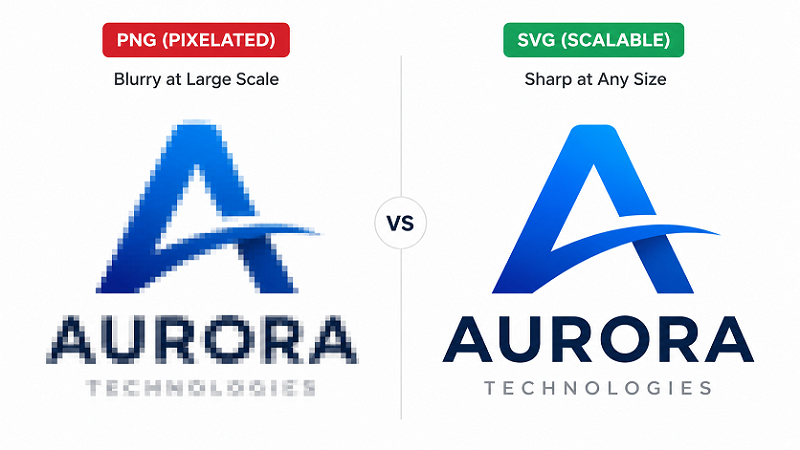
If you have ever tried to use a PNG logo on a large print job and got a pixelated mess back from the printer, you have already experienced the difference between raster and vector formats firsthand.
PNG and SVG are both widely used for logos and web graphics, and people often treat them as interchangeable. They are not. They are built on different foundations, behave differently at scale, and belong in different situations. Knowing which one to use — and when — will save you a lot of headaches.
What PNG Is
PNG stands for Portable Network Graphics. It is a raster format, which means the image is stored as a fixed grid of pixels. Each pixel carries a colour value, and the total pixel count determines the file's resolution.
Unlike JPG, PNG uses lossless compression. No image data is thrown away when the file is saved, which means edges and flat colour areas stay crisp. This is why PNG became the go-to format for logos and icons on the web.
PNG also supports an alpha channel, which gives you full transparency. That is why you can drop a PNG logo onto any background colour and it sits cleanly without a white box around it.
The one thing PNG cannot do
Scale. The image contains a fixed number of pixels. Enlarge a PNG beyond its native size and those pixels become visible — first as softness, then as obvious blocky pixelation. No amount of resolution boosting in an editing app changes that.
What SVG Is
SVG stands for Scalable Vector Graphics. It is a vector format, which means instead of pixels, the image stores mathematical descriptions of shapes.
A circle in an SVG is not a ring of coloured pixels. It is a set of instructions: a circle of this radius, centred at this point, filled with this colour. When the file is displayed or printed, the software executes those instructions at whatever size is required.
Scale an SVG to ten times its original size and the output is calculated fresh at the new dimensions. It is always sharp. A vector logo looks identical at 2cm and at 2 metres.
The added flexibility of SVG on the web
SVG files are XML — plain text describing shapes. That means they can be edited in a text editor, styled with CSS, animated with JavaScript, and indexed by search engines. For developers and designers working on modern websites, SVG is a significantly more flexible format than PNG.
When to Use PNG
PNG is the right call when:
- The image is photographic or contains continuous tones with millions of colours. SVG handles flat shapes and defined paths; it cannot represent photographs. PNG (or JPG) is the only option for that kind of image.
- You need maximum compatibility. Every browser, email client, and design tool understands PNG without issue.
- The display size is fixed and predictable. A favicon, a small thumbnail, an icon in a mobile app — if the image never needs to go larger, a high-resolution PNG is fine.
- The environment does not support SVG. Older CMS platforms, some email clients, and a handful of legacy tools handle transparent PNG more reliably than SVG.
When to Use SVG
SVG is the right call when:
- The image needs to appear at multiple sizes. A logo used on a website, business cards, signage, and merchandise all at once needs to be sharp everywhere. SVG guarantees that.
- You are printing large. Signage, banners, vehicle wraps, and exhibition graphics all require vector artwork. SVG files meet that requirement directly.
- The graphic is a logo, icon, or flat illustration. These are exactly what SVG was designed for.
- You want to control colours programmatically. With CSS, you can change an SVG logo's colour scheme for dark mode, hover states, or branded variations — something PNG cannot do.
- File size matters. A simple SVG logo is often dramatically smaller than a high-resolution PNG of the same design. Smaller files mean faster-loading pages.
The Scale Problem in Practice
Here is a concrete example. A PNG logo at 500x500 pixels looks fine on a website. Now you need it on a 6-foot banner. At 300 DPI print resolution, that banner needs an image approximately 21,600 pixels wide. Your 500-pixel PNG covers about 2% of that — the rest gets interpolated, and the result is a blurry print.
The same logo as an SVG? The vector renderer calculates the paths at the full banner size. The output is sharp. No extra work required.
That gap is why print shops, sign makers, and production studios consistently ask for vector files.
Can You Convert PNG to SVG?
Yes, and this is exactly what vector tracing does. A PNG is used as a reference, and the logo is rebuilt as clean vector paths in SVG format.
For simple logos with solid colours and clean edges, automated tools like Illustrator's Image Trace can produce a reasonable result. For anything more complex, or where quality actually matters, a manual vector redraw produces better output — cleaner paths, accurate curves, properly separated colours.
Frequently Asked Questions
Can I just change the file extension from .png to .svg? No. Renaming a file does not change the format. A PNG saved as .svg is still a raster image. It will still pixelate when scaled, and software expecting a true SVG may reject it or render it incorrectly.
Is SVG safe to use on modern websites? Yes. SVG is natively supported by all current browsers. It is the recommended format for logos and icons on the web, and it works well with screen readers when properly structured.
Does SVG support transparency? Yes, and the transparency is resolution-independent, which PNG's is not. An SVG can have transparent areas at any size without quality loss.
Should I keep both formats? In most professional workflows, SVG is the master file. PNG versions at specific resolutions are exported from it for situations that require raster images — email signatures, certain CMS uploads, legacy software. Start with a good SVG and everything else follows from it.
The Short Version
PNG works well for photographs and fixed-size digital use. SVG is the professional standard for logos, icons, and anything that needs to scale or print large.
If your logo only exists as a PNG, converting it to SVG is the single most useful thing you can do before your next print or production job. VectorFix converts PNG logos to clean, production-ready SVG files — fast.
Need artwork converted?
VectorFixer can redraw logos, convert PNG files to SVG, and prepare clean production-ready vector files.
Contact Us