The print shop sends back an email: "We need a vector file for this logo." You forward the JPG you have been using for years. They come back again: "This won't print cleanly at this size. Do you have an EPS or SVG?"
If that situation sounds familiar, vector tracing is the process you need.
The Core Idea
Vector tracing converts a raster image, like a JPG or PNG, into a vector file made of mathematically defined paths. The result is a file that can be scaled to any size without any loss of quality.
It is used most often for logos, but it applies to any flat graphic that needs to work across different sizes and production processes.
Raster vs Vector: A Quick Distinction
Raster images are grids of pixels. They have a fixed resolution. Scale them beyond that resolution and the pixels become visible. JPG, PNG, GIF, BMP, and TIFF are all raster formats.
Vector images store shapes as mathematical instructions rather than pixel grids. A vector circle is defined by its centre point, radius, and fill colour, not by thousands of coloured squares arranged in a ring. Scale it to any size and the software recalculates the shape at the new dimensions. SVG, EPS, AI, and PDF are vector formats.
That difference is why print shops, sign makers, embroidery studios, and vehicle wrap companies ask specifically for vector files. They need artwork that stays sharp regardless of output size.
What Vector Tracing Actually Does
The process uses the original raster file as a visual reference. A designer, or in some cases, automated software, analyses the shapes, edges, and colour areas in the image and recreates them as vector paths.
Each element of the logo gets redrawn: the outlines, the filled colour regions, any text or letterforms. The finished file contains clean vector paths instead of pixel data. From that point on, the file scales without any limit.
Manual Tracing vs Automated Tracing
There are two ways to approach vector tracing, and the quality difference is significant enough to matter in production.
Automated tracing
Adobe Illustrator's Image Trace feature is the most widely used automated tool. It scans the pixel data and generates vector paths based on what it finds. For a simple two-colour logo with clean high-contrast edges, it can produce a passable result.
For most real logos, the output is messier than it looks. Automated tracing tends to generate excessive anchor points, rough curves, and inconsistent colour areas. The file is technically a vector, but it can cause problems in Illustrator, in embroidery software, or at the printer, especially when the source image has any compression, low contrast, or fine detail.
Manual vector tracing
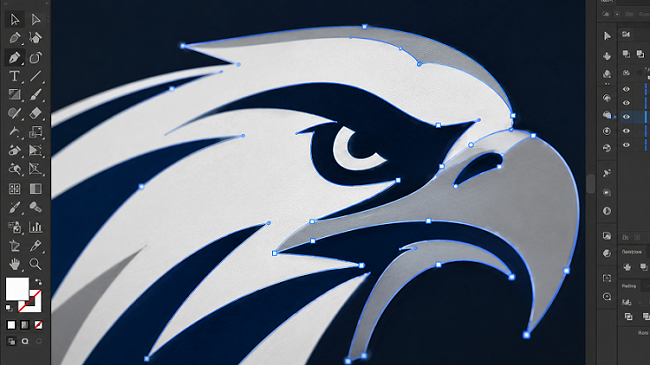
A professional traces the logo by hand, using the raster file as a guide and redrawing each element with vector tools. The paths are smooth and intentional. The colour areas are cleanly separated. The file is logically organised and behaves correctly in every downstream application.
This is what production environments actually need. If the file is going to a sign company, an embroidery house, a screen printer, or a large-format printer, a manually traced vector file is always the better deliverable.
What Can Be Vector Traced
Vector tracing works for any flat graphic that can be represented with defined shapes and colour regions:
- Logos and wordmarks — the most common use case by far
- Scanned hand-drawn artwork — illustrations, hand-lettered designs, sketches that have been photographed or scanned
- Old or compressed files — logos sourced from old stationery, websites, or archived folders that have degraded over time
- AI-generated logo concepts — image generators output raster files; any AI logo needs vectorisation before it can go to production
- Decorative elements and graphics — any artwork destined for signage, merchandise, or print that currently only exists as a raster file
Photographs are a different story. Continuous-tone images with millions of colours do not convert to vector in the traditional sense. A separate approach — image posterisation or stylised vectorisation — can turn a photo into a vector illustration, but that is a more involved creative process.
Industries That Require Vector Files
Vector tracing comes up across a wide range of production contexts:
- Large-format and commercial printing — banners, posters, trade show displays, and offset-printed materials all require vector artwork for logos
- Embroidery — digitising software needs clean, well-defined shapes to generate accurate stitch data
- Screen printing — spot colour printing requires flat, clearly bounded colour regions
- Vinyl cutting and Cricut machines — these machines follow vector paths; raster files cannot drive them directly
- Signage and vehicle graphics — sign companies and wrap studios work exclusively from vector source files
- Laser engraving and cutting — laser machines follow vector paths the same way vinyl cutters do
If your logo is going into any of these workflows, a vector file is not optional.
Frequently Asked Questions
How do I know if I need vector tracing? If a printer, sign maker, or embroidery studio has asked for a vector file and you only have a JPG or PNG, you need vector tracing. If your logo looks blurry or pixelated when printed at any significant size, same answer.
Can any logo be vector traced? Almost any logo or flat graphic can be traced. The quality of the source file affects how much interpretation is involved, but even small or heavily compressed logos can usually be redrawn. For extremely degraded files, it becomes more of a redraw from memory than a trace, which is fine as long as you have a clear sense of what the logo is supposed to look like.
Will the result match my original logo exactly? For logos with solid colours and clean shapes, yes, the vector version will be visually identical. Logos with gradients, drop shadows, or textures require some handling, since those effects work differently in vector format. A good vector artist will discuss options with you if that applies.
Do I need to do this more than once? No. Once a clean vector file exists, it is your master file. Store it somewhere safe and use it as the source for every production job going forward. You should never need to trace the same logo twice.
Get Your Logo Vector Traced
Once your logo exists as a clean vector file, the limitations of working from a low-resolution raster file are gone. Any size, any medium, any printer.
VectorFix does professional manual vector tracing with fast turnaround. Upload your file, and we will take care of it.
Need artwork converted?
VectorFixer can redraw logos, convert PNG files to SVG, and prepare clean production-ready vector files.
Contact Us