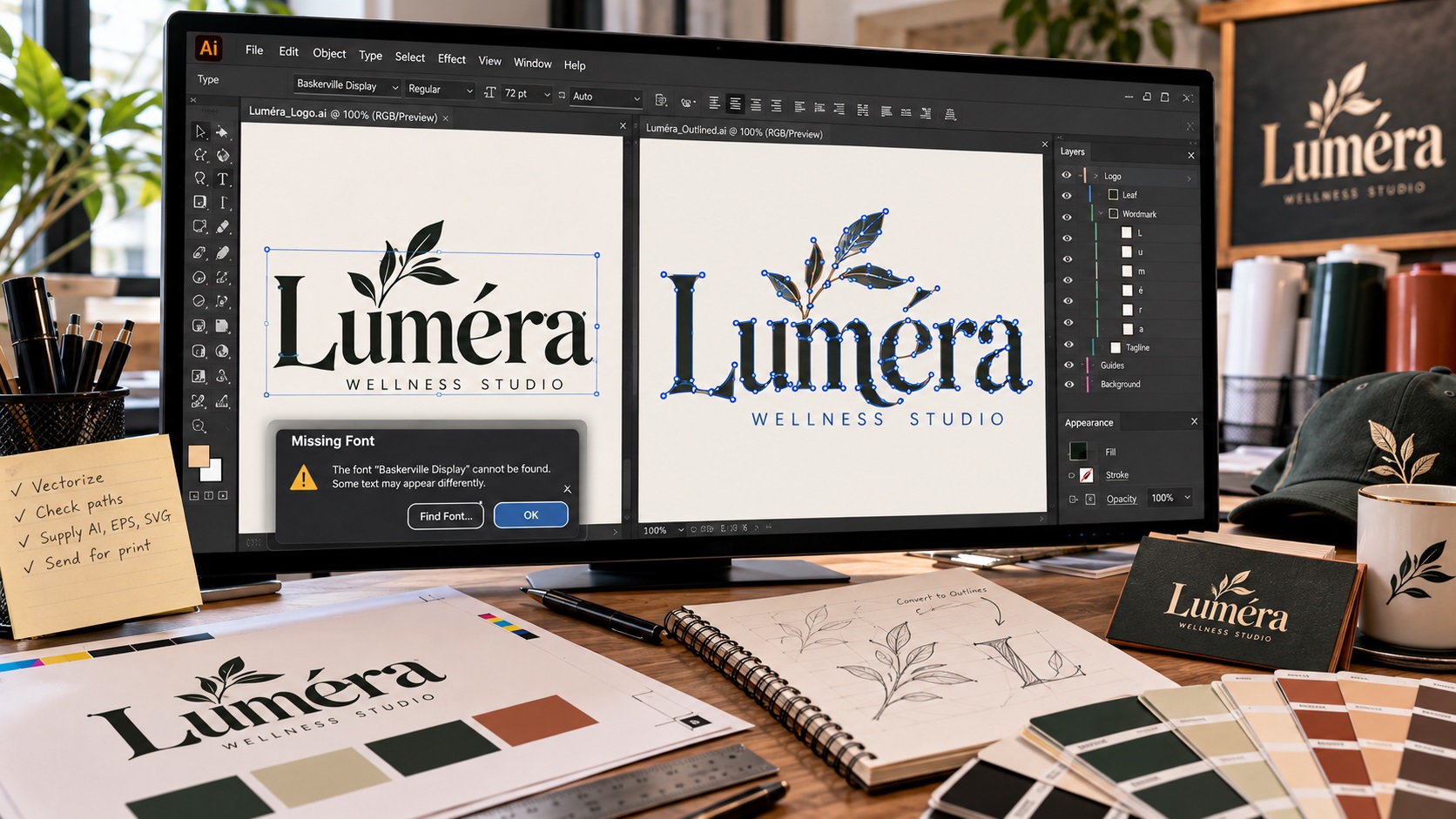
A printer may open your Illustrator, PDF, or EPS file and immediately ask you to convert the fonts to outlines. If you are not a designer, that request can sound technical for no obvious reason.
The issue is simple. Live text depends on the exact font file used to create it. If the printer does not have that font installed, the text can change, disappear, or be replaced with something completely different.
Converting fonts to outlines turns the letters into vector shapes. Once that happens, the printer no longer needs the original font to display or output the artwork correctly.
What does converting text to outlines mean?
When text is still live in Adobe Illustrator, each word is linked to a font. Illustrator knows the text content, font family, font weight, size, spacing, and other settings.
When you convert that text to outlines, Illustrator changes each letter into a vector object made from paths and anchor points.
The word still looks the same, but it is no longer editable as normal text.
For example, if your logo says "Oak & Stone" in a particular typeface, outlined text preserves the exact shape of every letter. The printer does not need the Oak & Stone font file because the letters themselves are now artwork.
Why printers care about missing fonts
Fonts are software files. A print shop may have thousands installed and still not have the exact font used in your artwork.
This becomes even more likely with:
- Custom fonts.
- Fonts purchased from smaller foundries.
- Adobe Fonts that are not activated on the printer's system.
- Canva or web-based fonts.
- Older fonts from a designer's computer.
- Modified or custom-drawn letterforms.
If the printer opens a file and the font is missing, several things can happen.
The text may be substituted with another font. Line breaks may change. Letter spacing may shift. A word may become wider or narrower. In packaging or signage, that can affect the entire layout.
For a logo, even a small substitution can make the brand look wrong.
What a missing font problem looks like
Imagine a restaurant sends a menu board file to a sign shop. The prices use one typeface, while the headings use another. The sign shop has the body font but not the heading font.
When the file opens, Illustrator warns that a font is missing. If the shop substitutes another font just to open the file, the headings can reflow and change size. A carefully aligned layout is suddenly wrong.
The same thing happens with logo wordmarks. A substituted font can make the logo look noticeably different even if the replacement seems similar.
Outlining the text before sending the file removes that risk.
How to convert fonts to outlines in Adobe Illustrator
Before doing anything, save a separate editable copy of your file.
Then:
- Open the artwork in Adobe Illustrator.
- Select the text you want to convert.
- Go to Type > Create Outlines.
- Check that the letters still look correct.
- Save the production version as a new file.
A common naming approach is:
- Brand-Logo-Editable.ai
- Brand-Logo-Outlined.ai
That makes it obvious which file can still be edited as text.
Why you should not outline your only copy
Once text is outlined, normal text editing is gone.
You cannot simply click into the word and correct a spelling mistake. You cannot easily change the font. You cannot update the wording as quickly as you could with live text.
That is why designers normally keep two versions:
- A master file with editable text.
- A production file with outlined text.
The production file is safer for printers. The editable file is safer for future changes.
If you only have an outlined file and later need to change the wording, the designer may have to recreate the text from scratch.
Does outlining text make a file vector?
Not by itself.
Outlining converts live text into vector shapes, but it does not fix raster images elsewhere in the file.
For example, an Illustrator file might contain outlined text plus a low-resolution JPG logo mark. The letters are vector, but the JPG is still raster.
This is why simply opening a file in Illustrator is not enough to make it production ready.
If the artwork contains a low-quality image that needs rebuilding, a professional vector redraw may still be required.
When printers usually ask for outlined fonts
Packaging
Packaging files often pass through several systems and vendors. Outlined text helps prevent font substitution during prepress and production.
Signage
Sign shops frequently receive Illustrator or EPS artwork from many different designers. Outlining prevents missing-font issues when artwork is enlarged, cut, routed, or printed.
Screen printing
Screen printers often separate artwork by color before outputting films or screens. Outlined text makes the artwork more predictable during that process.
Promotional products
Factories producing mugs, pens, bags, awards, and other branded products may use older or specialized software. Outlined text improves compatibility because the file no longer depends on a font library.
Large-format printing
Banners, displays, wall graphics, and trade-show panels are often processed through RIP software. Outlining important brand text helps reduce surprises during output.
What about PDFs?
PDFs can embed fonts, which often allows text to display correctly without outlining. That does not mean every printer will accept live fonts in a PDF.
Some production workflows still prefer outlined artwork, especially when the file will be edited, separated, cut, or imported into another program.
If your printer specifically asks for outlined fonts, follow their requirement rather than assuming an embedded PDF font will be enough.
What if I do not have Illustrator?
If your supplier asks for outlined text and you only have a Canva file, PNG, JPG, or PDF, you may not be able to create a proper outlined production file yourself.
The best option depends on what you have.
If the PDF contains real vector text, a designer may be able to open it and convert the type to outlines.
If the text is flattened into an image, the lettering may need to be identified and rebuilt.
If the logo is very small or blurry, the entire logo may need to be redrawn rather than simply converted.
VectorFixer can rebuild low-quality logo artwork into clean vector files when the original production files are missing.
Should all text be outlined before printing?
Not always.
For a final production file, outlining important logo and display text is common and often helpful. For documents that need frequent editing, such as long brochures or reports, outlining every paragraph can make the file difficult to manage and unnecessarily complex.
The printer's workflow matters. Ask what they need.
For logos, signs, packaging panels, and simple branded graphics, outlined text is usually a safe production choice when requested.
How to check if text is already outlined
Open the file in Illustrator and click on the lettering.
If you can place a text cursor inside the word and type, it is still live text.
If selecting the lettering shows individual vector paths and anchor points around each letter, the text has been outlined.
You can also look at the Layers panel. Live text usually appears as a text object. Outlined lettering appears as groups or compound paths.
A useful file package for your logo
A well-prepared logo package should make life easy for both your team and your suppliers.
A practical package might contain:
- Editable AI master with live text where appropriate.
- Outlined AI production file.
- EPS file.
- Vector PDF.
- SVG file.
- Transparent PNG files.
- One-color logo version.
- White or reversed logo version.
That gives the business an editable source while also giving printers a safer production file.
Frequently asked questions
Why did my printer say a font is missing?
The artwork uses a font that is installed on the designer's computer but not on the printer's system. Without the font file, the software cannot reproduce the live text exactly.
Is converting to outlines the same as embedding fonts?
No. Embedding keeps the text as font-based text inside a compatible file. Outlining turns the letters into vector shapes. The two approaches solve similar compatibility problems in different ways.
Will outlining change how my logo looks?
It should not. A properly outlined wordmark should look visually identical to the live-text version. The main difference is that the letters are now shapes rather than editable text.
Can I undo outlined text later?
Not reliably after the file has been closed and saved. Keep an editable master before creating outlines.
Send a production version, keep an editable version
If a printer asks you to outline fonts, the safest approach is to send a production copy with outlined lettering while keeping your editable master untouched.
If you no longer have the original logo file or the text has already been flattened into a low-quality image, send the artwork to VectorFix. The logo can be rebuilt into clean vector files that are easier to use with printers and other suppliers.
Need artwork converted?
VectorFixer can redraw logos, convert PNG files to SVG, and prepare clean production-ready vector files.
Contact Us