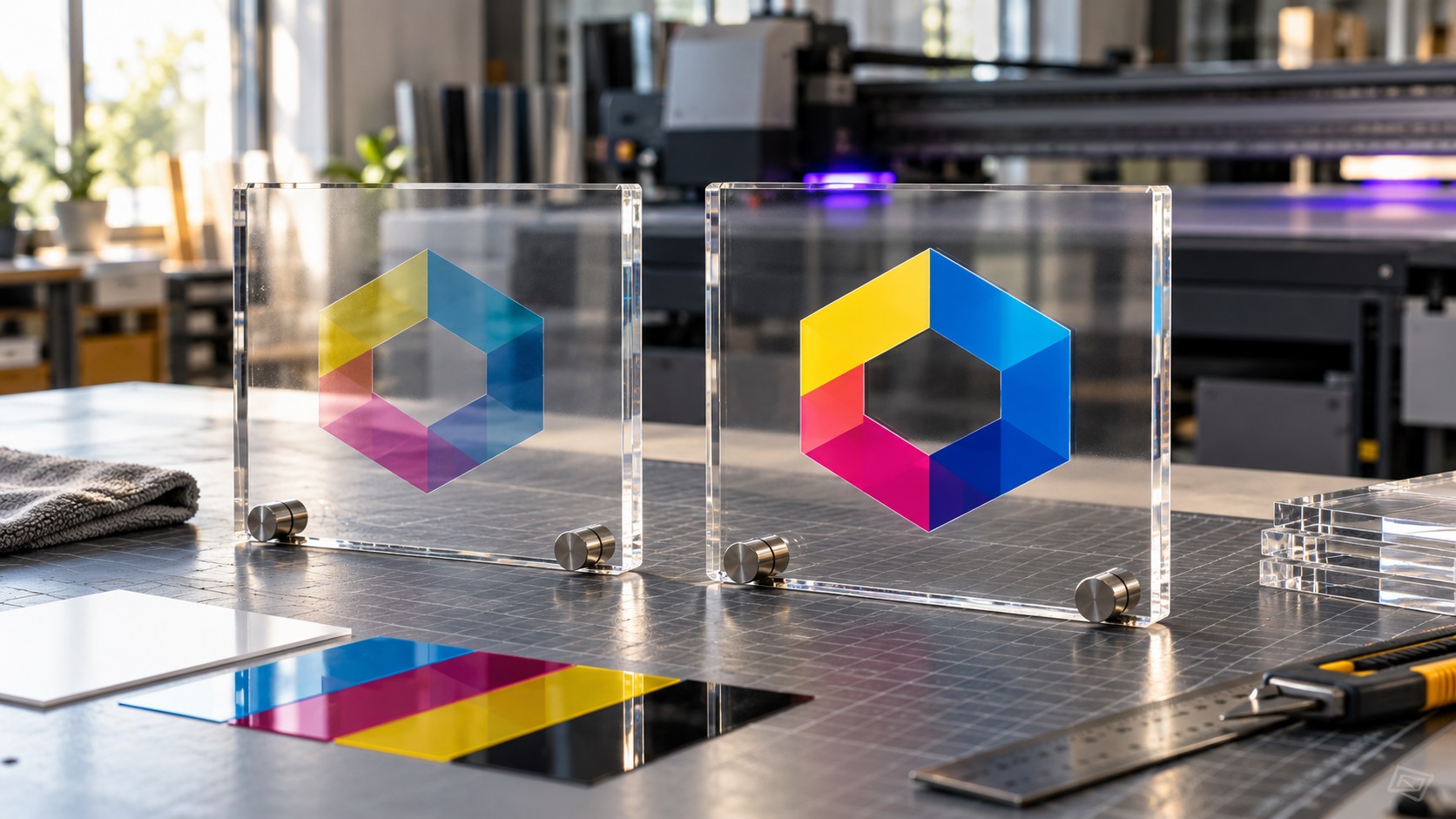
A full-color logo looks rich on a white screen, so you order the same design on a clear acrylic sign. The first sample arrives and the colors look pale. On a wall or window, parts of the logo almost disappear.
This can happen even when the artwork is sharp and the printer is working correctly. The missing piece may be white ink behind the design.
When a logo is UV printed onto transparent acrylic, the printer has to account for light passing through the material. Understanding the white layer helps you order desk signs, retail displays, acrylic nameplates, product panels, and branded awards that actually look the way you expected.
Why does a logo look washed out on clear acrylic?
Standard full-color printing uses cyan, magenta, yellow, and black inks, commonly called CMYK. These inks often rely on a white or light-colored surface behind them to reflect light and make the colors look strong.
Clear acrylic has no built-in white backing. Light can pass through the panel, and whatever sits behind the sign becomes part of what you see.
That means a blue logo printed on clear acrylic may appear different against a black wall, a white desk, or a brightly lit window.
The artwork can be correctly colored while the finished sign still looks lighter than the screen preview.
A white ink layer can provide a more consistent background beneath the colored portions of the design.
What does the white ink underbase actually do?
A white underbase is a layer of white ink placed beneath selected printed colors, relative to the intended viewing direction.
Its purpose is to prevent the clear acrylic or dark background from changing the appearance of those colors.
Imagine printing a red wordmark on clear acrylic. Without a white backing, the red may look translucent. With a properly aligned white layer, the same red can appear much more opaque.
But white ink is not automatically needed everywhere. Some acrylic projects deliberately use transparent or translucent areas.
For example:
- A full-color brand name may need white backing to remain readable.
- A clear window around the logo should remain unprinted.
- A translucent accent can be left without white ink as a design choice.
- An opaque white company logo may use white ink as a visible design color.
It helps to tell the print shop what you want the finished sign to look like, not just which colors are in the file.
The first decision: will the sign be viewed from the front or through the acrylic?
This is one of the most important questions in a clear acrylic job.
Printing directly on the front surface
For a design viewed from the printed side, the production process may place the white backing first, followed by colored ink, depending on the machine and workflow.
The finished print is exposed on the face of the acrylic, unless the supplier adds a suitable protective finish.
Reverse printing on the back surface
For a design viewed through the acrylic, the shop may print the color image in reverse on the rear face and add white ink behind it.
From the front, you see the correct-reading logo through the clear material. The acrylic itself sits between the viewer and the printed ink.
The design needs the appropriate mirror orientation and layer order for that workflow.
Do not mirror the file yourself unless the sign shop asks you to. Some printers handle mirroring in their software, and double-mirroring can leave text reading backward.
Why a transparent PNG does not tell the whole story
A transparent PNG can be useful artwork for UV printing. It shows which pixels are visible and which are clear.
However, it does not necessarily tell the printer where white backing should be printed.
Some UV printing workflows generate a white layer automatically from visible artwork. Others ask for a separate named spot color, an additional channel, or a clearly defined layer.
The exact setup depends on the printer, RIP software, substrate, and print provider.
A PNG can also contain soft, partly transparent edges that produce an unexpected white fringe if the white backing is generated too broadly.
A clean vector logo is often easier to inspect and separate into clear, white, and colored parts before production.
If your original file is a blurry PNG or JPG, VectorFixer's logo vectorization service can rebuild its visible shapes as scalable artwork.
What is a white-ink spot layer?
In some production systems, a spot layer marks the exact shapes that will receive white ink.
It may use a specially named swatch or separate object layer in a PDF or Illustrator file.
This is not the same thing as simply drawing the logo in white on a normal RGB or CMYK layer.
A visible white fill may represent the intended appearance, but the RIP needs the correct instruction to route that artwork to its white ink channel.
Different systems use different channel names and overprint settings. There is no universal name you should type into every file.
Ask your print shop for its artwork template or the precise white-ink instructions before creating those layers.
If the vendor prefers to generate white ink itself, send a clean source file and explain exactly which areas should be opaque and which should stay clear.
Why the white layer must be aligned carefully
A white underbase that extends beyond the color image can leave a visible white edge around the finished logo.
A white layer that is too small can cause colored edges to look translucent or weak.
Production software can adjust the backing shape slightly inward, sometimes called choke, to keep the white ink hidden beneath the colored edges.
The correct amount depends on the device and design. Tiny letters and thin lines may need especially careful setup.
For that reason, a white halo is not always a logo-redraw problem. It may be caused by the way the print layers are generated or registered.
Ask for a test sample and inspect the smallest text at normal viewing distance.
Should the logo be printed with white ink everywhere?
Not necessarily.
A transparent acrylic sign is often chosen because parts of the sign remain clear. Covering the entire design area with a white rectangle can defeat that effect.
There are several possible approaches:
Full white backing: Useful when the whole printed design needs a consistent opaque appearance.
Selective white backing: Useful when some logo elements should be strong and opaque while others remain translucent.
No white backing: Useful for intentionally transparent or stained-glass-like visual effects, provided you understand that the colors may look weaker.
White-only artwork: Useful for lettering or decorative shapes intended to be white on the clear material.
These are design decisions, not simply file-format decisions.
What file format should you send for UV printing on acrylic?
For logos, typography, and clear geometric shapes, many print suppliers prefer clean vector artwork such as AI, EPS, or vector PDF. Some also accept SVG.
Vector paths are easy to resize, inspect, and separate into printing regions.
For photographs and detailed raster graphics, a high-resolution PNG or another approved image format may be appropriate.
A reasonable handoff includes:
- The best editable logo master available.
- A flat visual proof showing the intended colors.
- A note marking clear versus opaque areas.
- The exact finished size.
- The intended viewing side.
- The desired background or installation setting.
- Any white-ink or varnish instructions from the supplier.
If the printer specifies a resolution for raster artwork, follow that requirement at the final physical size.
Watch for tiny letters and very thin lines
Acrylic products can be surprisingly small. A desk block, award, or tabletop QR sign may carry a logo only an inch or two wide.
Thin strokes and tiny letters can become difficult to print or inspect, especially when the design includes multiple ink layers.
Ask your supplier for the minimum reproducible line width and text size on the specific printer and acrylic product.
Do not rely on a universal measurement from another manufacturer.
If the tiny details are not essential, a simplified production version often looks better than shrinking every part of the original logo.
Vector cleanup can help when the design has uneven paths, stray objects, or accidental overlaps that complicate the printing file.
What about white ink, varnish, and protective coatings?
Some UV printers can add a clear or gloss layer to selected parts of the design. Others may use primer or another adhesion-related process for particular materials.
White ink controls opacity. Clear varnish and primer serve different purposes. They are not interchangeable layers.
Do not include a varnish layer merely because the printer can produce one. Ask whether the product will benefit from that finish, how it changes the appearance, and whether it affects the supplier's warranty or care instructions.
For an acrylic item handled regularly, a suitable protective process may matter more than a decorative gloss effect.
A practical example: acrylic reception sign
Imagine a reception sign with a blue wordmark, an orange icon, and a transparent background.
The business wants the mark to look strong on a wall that may be repainted later.
An appropriate proof should answer these questions:
- Will the sign be front printed or reverse printed?
- Will the blue and orange areas have white backing?
- Should the space inside the letters stay clear?
- Will the sign sit against a wall, stand off the wall, or hang in a window?
- How will the small text look at the actual finished size?
- Is the print protected on the intended installation side?
Without those decisions, both the designer and the printer can follow their own assumptions and still produce the wrong visual result.
What to ask the print shop before paying
A clear email or message can prevent an expensive reprint.
You might ask:
- Do you recommend white backing for this logo on clear acrylic?
- Will the artwork be read from the printed side or through the acrylic?
- Do you generate the white layer automatically?
- If I need a spot-white file, what exact swatch names and settings do you require?
- Can you show me a proof over both a light and dark background?
- Will the sample use the same material and layer stack as the final order?
- Are there any small details that need to be thickened?
These questions help the shop recommend the right process rather than guessing.
Common problems and what they usually mean
The colored logo looks pale
The design may have been printed without white backing, or with only partial backing. It could also be an intentional transparent print that was not explained clearly.
There is a white ring around the colors
The white ink may extend past the color boundary. Ask the shop to review its spot layer or automatically generated underbase.
The lettering is backward
The file may have been mirrored incorrectly for reverse printing. Confirm whether the operator or designer is responsible for mirroring.
A clear area printed white
The file may contain a white background object or a white layer that covers an intended transparent opening.
The colors change against different walls
A clear or partly transparent print allows the background to affect the appearance. Consider selective white backing if consistent color matters.
Frequently asked questions
Do you need white ink for UV printing on clear acrylic?
Not for every design. White backing usually helps opaque colors remain strong, but some projects deliberately use translucent printing.
Can I send a transparent PNG to an acrylic printer?
Many shops accept PNG files. Ask whether they generate the white layer or need a vector file with separate white-ink objects.
Is a vector PDF better than JPG for acrylic logos?
For logos and crisp lettering, a true vector PDF is often easier to scale and prepare. A PDF containing only a JPG does not provide those benefits.
Can white ink print as actual white lettering?
Yes, on equipment that supports it. The shop may need the lettering assigned to a specific white-ink channel.
Should I mirror the logo for back printing?
Only if the supplier tells you to. Some UV workflows handle mirroring during production.
Make the printing intention clear before the artwork is exported
A clear acrylic sign needs more than a sharp logo. The viewing direction, white backing, material, and intended opacity determine how the finished colors appear.
If your only source is a flattened logo, blurry PNG, or messy vector file, send the artwork to VectorFix along with the acrylic printer's instructions. A clean source file makes it easier to prepare the right color and clear areas before production.
Need artwork converted?
VectorFixer can redraw logos, convert PNG files to SVG, and prepare clean production-ready vector files.
Contact Us