You finally got your logo converted to a vector file. Now the designer or service is asking which format you want. EPS? AI? SVG? PDF? If you are not sure what the difference is, it is easy to just pick one and hope for the best.
Quick Answer
For printing, EPS, PDF, or AI is usually safer than SVG. For websites, SVG is usually best. For editing, AI is often preferred if the vendor uses Adobe Illustrator. The right file depends on the workflow, so a good logo package usually includes more than one vector format.
Relevant VectorFixer service: Convert Logo to Vector.
But the wrong format can mean your printer cannot open it, your website cannot display it, or your cutting machine does not recognize it. Here is a clear breakdown of each format and when to use which one.
Why There Are Multiple Vector Formats
Vector files all work on the same basic idea: storing shapes as mathematical paths instead of pixels. But different software programs, printers, and workflows developed their own formats over the years, each with slightly different features and compatibility.
Think of it like different document formats. A Word file and a Google Doc can both contain the same text, but they open in different programs and have slightly different features. Vector formats are similar.
The good news is that a properly built vector file can usually be converted between formats fairly easily. So if you get the wrong one, it is not a disaster. But knowing what to ask for upfront saves you a step.
AI Files (Adobe Illustrator)
AI is the native file format for Adobe Illustrator. It is what Illustrator saves by default, and it preserves every feature of your design exactly as it was built, including editable text, separate layers, symbols, and any effects applied in Illustrator.
Best for:
- Working designers who use Illustrator
- Making future edits to the logo
- Handing off to another designer for layout or print work
- Print production workflows at shops that use Adobe software
Watch out for:
AI files can only be properly opened and edited in Adobe Illustrator. If someone sends you an AI file and you do not have Illustrator, you will not be able to open it without a workaround. AI files also sometimes have compatibility issues between older and newer versions of the software.
EPS Files (Encapsulated PostScript)
EPS is one of the oldest vector formats still in wide use. It was created for print production and has been a standard in the printing industry for decades. Most professional print software, including older systems at commercial print shops, can open EPS files reliably.
Best for:
- Sending logos to commercial print shops, sign shops, and screen printers
- Working with older printing equipment or software
- Maximum compatibility across professional print production environments
- Embroidery digitizers who need a simple, clean source file
Watch out for:
EPS is an older format and does not support some modern features well, such as transparency effects. Some EPS files also embed a low-resolution preview image for on-screen display, which can look blurry even though the actual vector data is fine. Do not judge an EPS file by its screen preview.
SVG Files (Scalable Vector Graphics)
SVG is the vector format built for the web and digital environments. Unlike AI and EPS, which were designed around print production, SVG was designed to work directly in browsers and digital applications.
Best for:
- Websites and web applications where the logo needs to display at any resolution
- Cricut, Silhouette, and other cutting machines
- Apps, icons, and UI design work
- Any digital environment where a scalable logo is needed
- Developers who want to use logo code directly in a website
Watch out for:
Not all SVG files are created equal. An SVG produced by auto-tracing or a bad converter can be messy, with thousands of unnecessary points and shapes. A clean, manually traced SVG is a different thing entirely. Some older print shop software also does not handle SVG well, so for print production, EPS or AI is still the safer choice.
PDF (Portable Document Format)
PDF is not exclusively a vector format, but when a vector file is saved as a PDF, it preserves the vector data. Many designers deliver logos as PDFs because it is a format almost everyone can open.
Best for:
- Sharing a logo that needs to look good on screen and be viewable by anyone without special software
- Sending to print shops that specify PDF as their preferred input format
- Attaching to emails or proposals where the recipient just needs to see the logo
Watch out for:
A PDF can be vector or it can be a flat image, depending on how it was saved. A PDF of your logo exported from Illustrator will be vector. A PDF created by scanning a printed logo or exporting from a raster program will just be an image file with a PDF wrapper. The format alone does not guarantee it is a vector.
Which Format Should You Ask For?
Here is a quick guide based on what you need the file for.
For a print shop or sign shop: Ask for EPS or AI. EPS works across the widest range of professional print software. AI is great if the shop uses Illustrator.
For a screen printer or embroidery digitizer: EPS or AI, same as above.
For your website or an app: SVG is the right choice. It displays sharply at any screen size and resolution.
For a Cricut or cutting machine: SVG is what you need. Make sure it is a clean, properly structured SVG with closed paths.
For sharing or previewing: PDF works well when you just need someone to be able to see and use the logo without having design software.
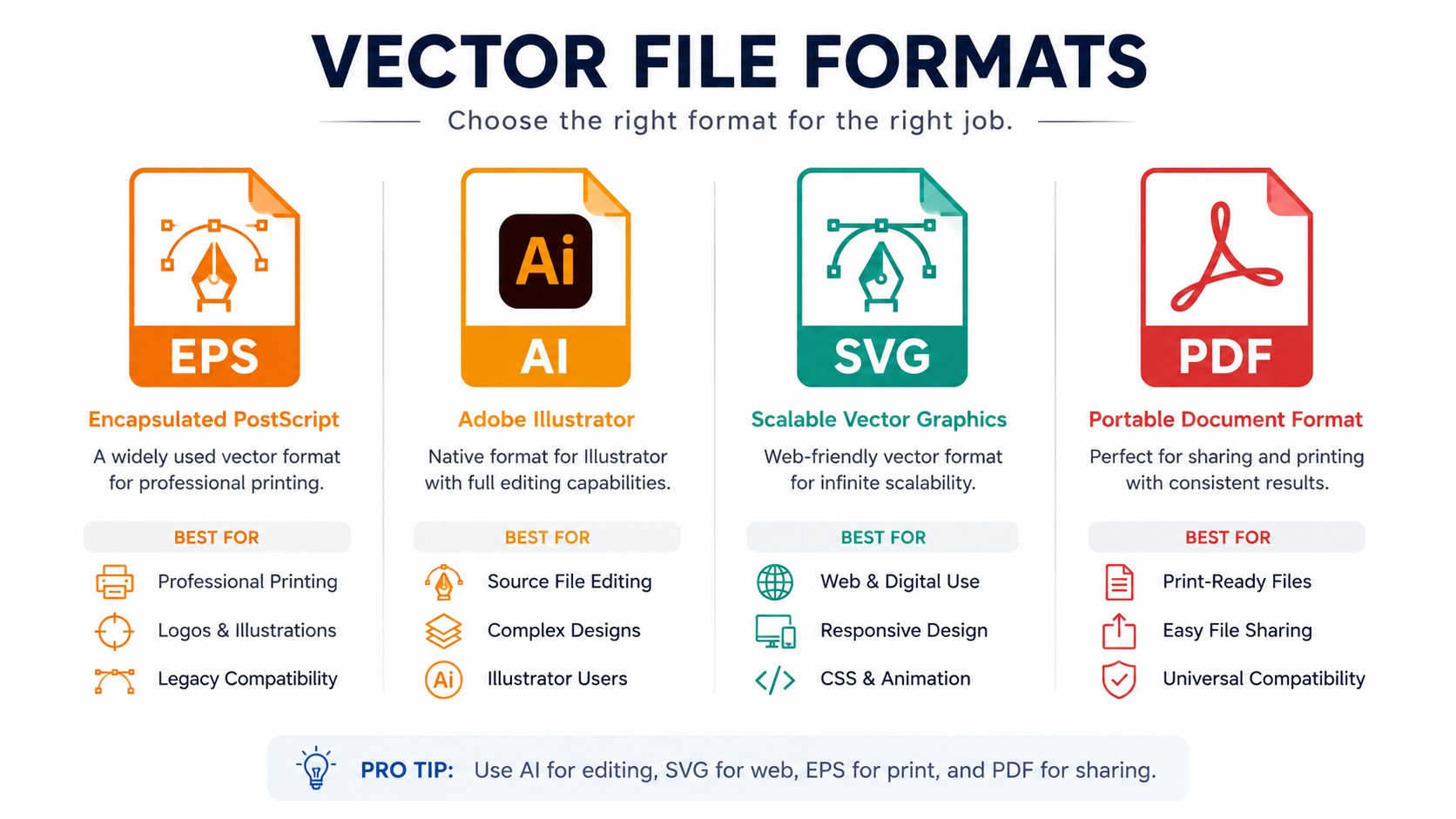
To future-proof your brand assets: Get all of them. AI for editing, EPS for print production, SVG for digital use, and PDF for easy sharing. A good vectorization service will provide all of these.
Need the right vector file package?
VectorFixer can convert your logo and provide practical SVG, EPS, PDF, AI, and PNG exports so you are not stuck guessing which file a vendor needs. Use the project submission form to upload the artwork and include any vendor requirements.
Related Guides
Frequently Asked Questions
Can I convert an EPS to an SVG myself?
Yes. If you have Adobe Illustrator, you can open an EPS and export it as an SVG. Inkscape, which is free, can also do this. The quality of the conversion depends on how clean the original EPS is.
I was given a PDF of my logo. Is it a vector?
Maybe. Open it in Illustrator and try to select individual shapes. If you can select and move paths and anchor points, it is a vector. If clicking on it selects the whole thing as a flat image, it is a raster PDF.
My website developer says they need an SVG. Can I just rename my PNG to SVG?
No. Changing a file extension does not change the file type. A PNG renamed to SVG is still a PNG. A proper SVG needs to be built or converted from actual vector data.
What is the difference between an EPS and an AI file if they both open in Illustrator?
AI files preserve every Illustrator-specific feature, including layers, live effects, and editable text. EPS is a simpler format that strips out some of those features to ensure compatibility with non-Illustrator software. For basic logos with flat colors and no complex effects, the difference is minimal.
Does the vector format affect print quality?
No. As long as the file is a true vector with clean paths, the output quality from a print shop will be the same regardless of whether you gave them an AI, EPS, or vector PDF.
Need artwork converted?
VectorFixer can redraw logos, convert PNG files to SVG, and prepare clean production-ready vector files.
Contact Us